This time we’re going bigger than ever. Fabric, Power BI, SQL, AI and more. We're covering it all. You won't want to miss it.
Learn moreLevel up your Power BI skills this month - build one visual each week and tell better stories with data! Get started
Hi all,
When I embed the URL into my JavaFX app to load in a WebView, I see the report loading part but then it is just all white. Every other webpage shows fine. Does anyone know why my reports are not showing, while when I enter the URL in the browser directly everything shows up fine.
(link: https://app.powerbi.com/view?r=eyJrIjoiMzdiNGIzOWMtOGFiMi00YTc0LWFhYmYtZjcyN2E3YzljYTY1IiwidCI6IjQzY...)
My code :
WebView webView = new WebView();
WebEngine webEngine = webView.getEngine();
webEngine.load("https://app.powerbi.com/view?r=eyJrIjoiMzdiNGIzOWMtOGFiMi00YTc0LWFhYmYtZjcyN2E3YzljYTY1IiwidCI6IjQzY2Q3MWNlLTBjODYtNGMxZi05NTc1LTBlMzg4YWEwZDY4YiIsImMiOjh9");Thanks in advance
Solved! Go to Solution.
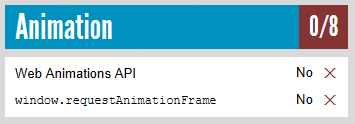
I've had a test. Based on my research, it seems to be not supported in the JavaFX embedded browser. See Supported browsers for Power BI.
webEngine.load("http://html5test.com/");
I'm not familiar with JavaFX. You may check if it is affected by HTTPS.
Thanks for your reply, sorry what do you mean by affected by https?
I mean have you tried other URLs that start with https, not http?
Every other URL works fine and displays properly, just except for the content of the report.
I've had a test. Based on my research, it seems to be not supported in the JavaFX embedded browser. See Supported browsers for Power BI.
webEngine.load("http://html5test.com/");
Check out the April 2026 Power BI update to learn about new features.
Sign up to receive a private message when registration opens and key events begin.
If you have recently started exploring Fabric, we'd love to hear how it's going. Your feedback can help with product improvements.
| User | Count |
|---|---|
| 4 | |
| 2 | |
| 1 | |
| 1 | |
| 1 |