Get certified for free when you join Fabric Data Days 2026 and dive into Fabric, Power BI, SQL, AI, and other essential data skills.
Join nowData Days is here! Join us now for 60+ days of learning, challenges, and connection. Learn more
Hi all,
When I embed the URL into my JavaFX app to load in a WebView, I see the report loading part but then it is just all white. Every other webpage shows fine. Does anyone know why my reports are not showing, while when I enter the URL in the browser directly everything shows up fine.
(link: https://app.powerbi.com/view?r=eyJrIjoiMzdiNGIzOWMtOGFiMi00YTc0LWFhYmYtZjcyN2E3YzljYTY1IiwidCI6IjQzY...)
My code :
WebView webView = new WebView();
WebEngine webEngine = webView.getEngine();
webEngine.load("https://app.powerbi.com/view?r=eyJrIjoiMzdiNGIzOWMtOGFiMi00YTc0LWFhYmYtZjcyN2E3YzljYTY1IiwidCI6IjQzY2Q3MWNlLTBjODYtNGMxZi05NTc1LTBlMzg4YWEwZDY4YiIsImMiOjh9");Thanks in advance
Solved! Go to Solution.
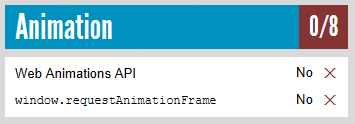
I've had a test. Based on my research, it seems to be not supported in the JavaFX embedded browser. See Supported browsers for Power BI.
webEngine.load("http://html5test.com/");
I'm not familiar with JavaFX. You may check if it is affected by HTTPS.
Thanks for your reply, sorry what do you mean by affected by https?
I mean have you tried other URLs that start with https, not http?
Every other URL works fine and displays properly, just except for the content of the report.
I've had a test. Based on my research, it seems to be not supported in the JavaFX embedded browser. See Supported browsers for Power BI.
webEngine.load("http://html5test.com/");
Don't miss out on Data Days, June 15 through August 7. Learn Fabric, Power BI, SQL, AI and more.
Check out the May 2026 Power BI update to learn about new features.
| User | Count |
|---|---|
| 2 | |
| 2 | |
| 1 | |
| 1 | |
| 1 |