This time we’re going bigger than ever. Fabric, Power BI, SQL, AI and more. We're covering it all. You won't want to miss it.
Learn moreLevel up your Power BI skills this month - build one visual each week and tell better stories with data! Get started
Hello,
Can you please help me understanding how an aggregation function works on a row level? ( Sum for example )
I thought it would behave like Excel, but this is what happens ( it summarizes everything on each row):
Just trying to understand, thank you very much
Lucas
Solved! Go to Solution.
@Lvmoraes wrote:
Hi Erik,
not really, the question actually is why the sum is not summing the values for that record? Example:
Product Tax Sum(Tax)
Belt 0 0
Hat 1 1
Instead, it will ignore the row and sum the total, like:
Product Tax Sum(Tax)
Belt 0 1
Hat 1 1
It's the red 1 I don't get.
Your example is really cool, I will accept it as correct... but if you can just confirm that's how PowerBI behaves if you try to Aggregate at a column, would be fine.
Kind regards,
Lucas
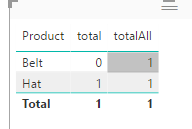
If you mean measures in a chart, it's all about context. See
total = SUM(yourTable[Tax]) totalAll = SUMX(ALLSELECTED(yourTable),yourTable[Tax])
@Lvmoraes wrote:
Hello,
Can you please help me understanding how an aggregation function works on a row level? ( Sum for example )
I thought it would behave like Excel, but this is what happens ( it summarizes everything on each row):
Just trying to understand, thank you very much
Lucas
What do you mean "in a row level"? If you refer to "product" level, you can try
SumColumn = CALCULATE(SUM(MapProds[Tax]),ALLEXCEPT(MapProds,MapProds[Product]))
Hi Erik,
not really, the question actually is why the sum is not summing the values for that record? Example:
Product Tax Sum(Tax)
Belt 0 0
Hat 1 1
Instead, it will ignore the row and sum the total, like:
Product Tax Sum(Tax)
Belt 0 1
Hat 1 1
It's the red 1 I don't get.
Your example is really cool, I will accept it as correct... but if you can just confirm that's how PowerBI behaves if you try to Aggregate at a column, would be fine.
Kind regards,
Lucas
@Lvmoraes wrote:
Hi Erik,
not really, the question actually is why the sum is not summing the values for that record? Example:
Product Tax Sum(Tax)
Belt 0 0
Hat 1 1
Instead, it will ignore the row and sum the total, like:
Product Tax Sum(Tax)
Belt 0 1
Hat 1 1
It's the red 1 I don't get.
Your example is really cool, I will accept it as correct... but if you can just confirm that's how PowerBI behaves if you try to Aggregate at a column, would be fine.
Kind regards,
Lucas
If you mean measures in a chart, it's all about context. See
total = SUM(yourTable[Tax]) totalAll = SUMX(ALLSELECTED(yourTable),yourTable[Tax])
Check out the April 2026 Power BI update to learn about new features.
Sign up to receive a private message when registration opens and key events begin.
If you have recently started exploring Fabric, we'd love to hear how it's going. Your feedback can help with product improvements.
| User | Count |
|---|---|
| 4 | |
| 2 | |
| 1 | |
| 1 | |
| 1 |
| User | Count |
|---|---|
| 10 | |
| 8 | |
| 3 | |
| 3 | |
| 2 |