cancel
Showing results for 
Search instead for 
Did you mean: 

The Power BI Data Visualization World Championships is back! Get ahead of the game and start preparing now! Learn more

Reply
Lvmoraes
Helper I
Helper I

Using sum in a row level - Understanding

Hello,


Can you please help me understanding how an aggregation function works on a row level? ( Sum for example )
I thought it would behave like Excel, but this is what happens ( it summarizes everything on each row):9.PNG


Just trying to understand, thank you very much


Lucas

1 ACCEPTED SOLUTION


@Lvmoraes wrote:

Hi Erik,


not really, the question actually is why the sum is not summing the values for that record? Example:

Product  Tax  Sum(Tax)

Belt          0        0

Hat          1        1


Instead, it will ignore the row and sum the total, like:

Product  Tax  Sum(Tax)

Belt          0        1

Hat          1        1


It's the red 1 I don't get.


Your example is really cool, I will accept it as correct... but if you can just confirm that's how PowerBI behaves if you try to Aggregate at a column, would be fine.


Kind regards,

Lucas


@Lvmoraes

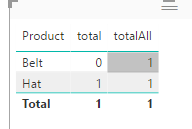
If you mean measures in a chart, it's all about context. See

total = SUM(yourTable[Tax])

totalAll = SUMX(ALLSELECTED(yourTable),yourTable[Tax])

Capture.PNG

View solution in original post

3 REPLIES 3
Eric_Zhang
Microsoft Employee
Microsoft Employee


@Lvmoraes wrote:

Hello,


Can you please help me understanding how an aggregation function works on a row level? ( Sum for example )
I thought it would behave like Excel, but this is what happens ( it summarizes everything on each row):9.PNG


Just trying to understand, thank you very much


Lucas


@Lvmoraes

What do you mean "in a row level"? If you refer to "product" level, you can try

SumColumn = CALCULATE(SUM(MapProds[Tax]),ALLEXCEPT(MapProds,MapProds[Product]))

Capture.PNG

Hi Erik,


not really, the question actually is why the sum is not summing the values for that record? Example:

Product  Tax  Sum(Tax)

Belt          0        0

Hat          1        1


Instead, it will ignore the row and sum the total, like:

Product  Tax  Sum(Tax)

Belt          0        1

Hat          1        1


It's the red 1 I don't get.


Your example is really cool, I will accept it as correct... but if you can just confirm that's how PowerBI behaves if you try to Aggregate at a column, would be fine.


Kind regards,

Lucas


@Lvmoraes wrote:

Hi Erik,


not really, the question actually is why the sum is not summing the values for that record? Example:

Product  Tax  Sum(Tax)

Belt          0        0

Hat          1        1


Instead, it will ignore the row and sum the total, like:

Product  Tax  Sum(Tax)

Belt          0        1

Hat          1        1


It's the red 1 I don't get.


Your example is really cool, I will accept it as correct... but if you can just confirm that's how PowerBI behaves if you try to Aggregate at a column, would be fine.


Kind regards,

Lucas


@Lvmoraes

If you mean measures in a chart, it's all about context. See

total = SUM(yourTable[Tax])

totalAll = SUMX(ALLSELECTED(yourTable),yourTable[Tax])

Capture.PNG

Helpful resources

Announcements
Power BI DataViz World Championships

Power BI Dataviz World Championships

The Power BI Data Visualization World Championships is back! Get ahead of the game and start preparing now!

December 2025 Power BI Update Carousel

Power BI Monthly Update - December 2025

Check out the December 2025 Power BI Holiday Recap!

FabCon Atlanta 2026 carousel

FabCon Atlanta 2026

Join us at FabCon Atlanta, March 16-20, for the ultimate Fabric, Power BI, AI and SQL community-led event. Save $200 with code FABCOMM.