Don't miss your chance to take the Fabric Data Engineer (DP-600) exam for FREE! Find out how by attending the DP-600 session on April 23rd (pacific time), live or on-demand.
Learn moreNext up in the FabCon + SQLCon recap series: The roadmap for Microsoft SQL and Maximizing Developer experiences in Fabric. All sessions are available on-demand after the live show. Register now
Hello,
Can you please help me understanding how an aggregation function works on a row level? ( Sum for example )
I thought it would behave like Excel, but this is what happens ( it summarizes everything on each row):
Just trying to understand, thank you very much
Lucas
Solved! Go to Solution.
@Lvmoraes wrote:
Hi Erik,
not really, the question actually is why the sum is not summing the values for that record? Example:
Product Tax Sum(Tax)
Belt 0 0
Hat 1 1
Instead, it will ignore the row and sum the total, like:
Product Tax Sum(Tax)
Belt 0 1
Hat 1 1
It's the red 1 I don't get.
Your example is really cool, I will accept it as correct... but if you can just confirm that's how PowerBI behaves if you try to Aggregate at a column, would be fine.
Kind regards,
Lucas
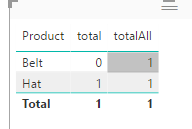
If you mean measures in a chart, it's all about context. See
total = SUM(yourTable[Tax]) totalAll = SUMX(ALLSELECTED(yourTable),yourTable[Tax])
@Lvmoraes wrote:
Hello,
Can you please help me understanding how an aggregation function works on a row level? ( Sum for example )
I thought it would behave like Excel, but this is what happens ( it summarizes everything on each row):
Just trying to understand, thank you very much
Lucas
What do you mean "in a row level"? If you refer to "product" level, you can try
SumColumn = CALCULATE(SUM(MapProds[Tax]),ALLEXCEPT(MapProds,MapProds[Product]))
Hi Erik,
not really, the question actually is why the sum is not summing the values for that record? Example:
Product Tax Sum(Tax)
Belt 0 0
Hat 1 1
Instead, it will ignore the row and sum the total, like:
Product Tax Sum(Tax)
Belt 0 1
Hat 1 1
It's the red 1 I don't get.
Your example is really cool, I will accept it as correct... but if you can just confirm that's how PowerBI behaves if you try to Aggregate at a column, would be fine.
Kind regards,
Lucas
@Lvmoraes wrote:
Hi Erik,
not really, the question actually is why the sum is not summing the values for that record? Example:
Product Tax Sum(Tax)
Belt 0 0
Hat 1 1
Instead, it will ignore the row and sum the total, like:
Product Tax Sum(Tax)
Belt 0 1
Hat 1 1
It's the red 1 I don't get.
Your example is really cool, I will accept it as correct... but if you can just confirm that's how PowerBI behaves if you try to Aggregate at a column, would be fine.
Kind regards,
Lucas
If you mean measures in a chart, it's all about context. See
total = SUM(yourTable[Tax]) totalAll = SUMX(ALLSELECTED(yourTable),yourTable[Tax])
If you have recently started exploring Fabric, we'd love to hear how it's going. Your feedback can help with product improvements.
A new Power BI DataViz World Championship is coming this June! Don't miss out on submitting your entry.
Share feedback directly with Fabric product managers, participate in targeted research studies and influence the Fabric roadmap.
| User | Count |
|---|---|
| 1 | |
| 1 | |
| 1 | |
| 1 | |
| 1 |