Don't miss your chance to take the Fabric Data Engineer (DP-600) exam for FREE! Find out how by attending the DP-600 session on April 23rd (pacific time), live or on-demand.
Learn moreNext up in the FabCon + SQLCon recap series: The roadmap for Microsoft SQL and Maximizing Developer experiences in Fabric. All sessions are available on-demand after the live show. Register now
Hello,
Can you please help me understanding how an aggregation function works on a row level? ( Sum for example )
I thought it would behave like Excel, but this is what happens ( it summarizes everything on each row):
Just trying to understand, thank you very much
Lucas
Solved! Go to Solution.
@Lvmoraes wrote:
Hi Erik,
not really, the question actually is why the sum is not summing the values for that record? Example:
Product Tax Sum(Tax)
Belt 0 0
Hat 1 1
Instead, it will ignore the row and sum the total, like:
Product Tax Sum(Tax)
Belt 0 1
Hat 1 1
It's the red 1 I don't get.
Your example is really cool, I will accept it as correct... but if you can just confirm that's how PowerBI behaves if you try to Aggregate at a column, would be fine.
Kind regards,
Lucas
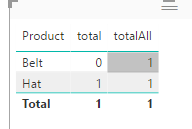
If you mean measures in a chart, it's all about context. See
total = SUM(yourTable[Tax]) totalAll = SUMX(ALLSELECTED(yourTable),yourTable[Tax])
@Lvmoraes wrote:
Hello,
Can you please help me understanding how an aggregation function works on a row level? ( Sum for example )
I thought it would behave like Excel, but this is what happens ( it summarizes everything on each row):
Just trying to understand, thank you very much
Lucas
What do you mean "in a row level"? If you refer to "product" level, you can try
SumColumn = CALCULATE(SUM(MapProds[Tax]),ALLEXCEPT(MapProds,MapProds[Product]))
Hi Erik,
not really, the question actually is why the sum is not summing the values for that record? Example:
Product Tax Sum(Tax)
Belt 0 0
Hat 1 1
Instead, it will ignore the row and sum the total, like:
Product Tax Sum(Tax)
Belt 0 1
Hat 1 1
It's the red 1 I don't get.
Your example is really cool, I will accept it as correct... but if you can just confirm that's how PowerBI behaves if you try to Aggregate at a column, would be fine.
Kind regards,
Lucas
@Lvmoraes wrote:
Hi Erik,
not really, the question actually is why the sum is not summing the values for that record? Example:
Product Tax Sum(Tax)
Belt 0 0
Hat 1 1
Instead, it will ignore the row and sum the total, like:
Product Tax Sum(Tax)
Belt 0 1
Hat 1 1
It's the red 1 I don't get.
Your example is really cool, I will accept it as correct... but if you can just confirm that's how PowerBI behaves if you try to Aggregate at a column, would be fine.
Kind regards,
Lucas
If you mean measures in a chart, it's all about context. See
total = SUM(yourTable[Tax]) totalAll = SUMX(ALLSELECTED(yourTable),yourTable[Tax])
If you have recently started exploring Fabric, we'd love to hear how it's going. Your feedback can help with product improvements.
A new Power BI DataViz World Championship is coming this June! Don't miss out on submitting your entry.
| User | Count |
|---|---|
| 1 | |
| 1 | |
| 1 | |
| 1 | |
| 1 |