Get certified for free when you join Fabric Data Days 2026 and dive into Fabric, Power BI, SQL, AI, and other essential data skills.
Join nowJuly 28 - August 9 | Final Round of the Power BI Dataviz World Championships. This is your chance. Learn more
Hello,
Can you please help me understanding how an aggregation function works on a row level? ( Sum for example )
I thought it would behave like Excel, but this is what happens ( it summarizes everything on each row):
Just trying to understand, thank you very much
Lucas
Solved! Go to Solution.
@Lvmoraes wrote:
Hi Erik,
not really, the question actually is why the sum is not summing the values for that record? Example:
Product Tax Sum(Tax)
Belt 0 0
Hat 1 1
Instead, it will ignore the row and sum the total, like:
Product Tax Sum(Tax)
Belt 0 1
Hat 1 1
It's the red 1 I don't get.
Your example is really cool, I will accept it as correct... but if you can just confirm that's how PowerBI behaves if you try to Aggregate at a column, would be fine.
Kind regards,
Lucas
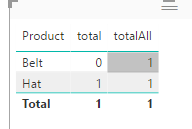
If you mean measures in a chart, it's all about context. See
total = SUM(yourTable[Tax]) totalAll = SUMX(ALLSELECTED(yourTable),yourTable[Tax])
@Lvmoraes wrote:
Hello,
Can you please help me understanding how an aggregation function works on a row level? ( Sum for example )
I thought it would behave like Excel, but this is what happens ( it summarizes everything on each row):
Just trying to understand, thank you very much
Lucas
What do you mean "in a row level"? If you refer to "product" level, you can try
SumColumn = CALCULATE(SUM(MapProds[Tax]),ALLEXCEPT(MapProds,MapProds[Product]))
Hi Erik,
not really, the question actually is why the sum is not summing the values for that record? Example:
Product Tax Sum(Tax)
Belt 0 0
Hat 1 1
Instead, it will ignore the row and sum the total, like:
Product Tax Sum(Tax)
Belt 0 1
Hat 1 1
It's the red 1 I don't get.
Your example is really cool, I will accept it as correct... but if you can just confirm that's how PowerBI behaves if you try to Aggregate at a column, would be fine.
Kind regards,
Lucas
@Lvmoraes wrote:
Hi Erik,
not really, the question actually is why the sum is not summing the values for that record? Example:
Product Tax Sum(Tax)
Belt 0 0
Hat 1 1
Instead, it will ignore the row and sum the total, like:
Product Tax Sum(Tax)
Belt 0 1
Hat 1 1
It's the red 1 I don't get.
Your example is really cool, I will accept it as correct... but if you can just confirm that's how PowerBI behaves if you try to Aggregate at a column, would be fine.
Kind regards,
Lucas
If you mean measures in a chart, it's all about context. See
total = SUM(yourTable[Tax]) totalAll = SUMX(ALLSELECTED(yourTable),yourTable[Tax])
Join us in Barcelona for FabCon and SQLCon, the Fabric, Power BI, SQL, and AI community event. Save €200 with code FABCMTY200.
If you love stickers, then you will definitely want to check out our community sticker challenge, Barcelona edition!
Check out the July 2026 Power BI update to learn about new features.
| User | Count |
|---|---|
| 2 | |
| 2 | |
| 1 | |
| 1 | |
| 1 |