This time we’re going bigger than ever. Fabric, Power BI, SQL, AI and more. We're covering it all. You won't want to miss it.
Learn moreLevel up your Power BI skills this month - build one visual each week and tell better stories with data! Get started
Hi, everybody!
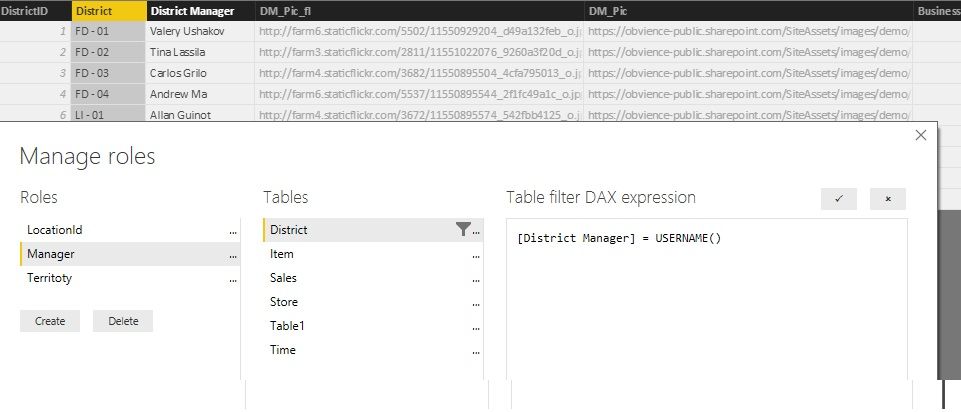
I'm testing Power BI RLS with embedded analytics, and I perform steps from this article: https://powerbi.microsoft.com/ru-ru/documentation/powerbi-developer-embedded-rls/#applying-user-and-...
However I stuck on generating embed token, as I always get error code Bad request with message "Invalid effective username provided"
var generateTokenRequestParameters = new GenerateTokenRequest(
accessLevel: "view",
identities: new List<EffectiveIdentity> {
new EffectiveIdentity(username: "Andrey Ma", roles: new List<string> { "Manager" },
datasets: new List<string> { "3c1a920e-8389-44a7-8375-c179bb3b0fb2" }
)});
var tokenResponse = await client.Reports.GenerateTokenInGroupAsync(groupId, "f8288d00-81fb-4ffb-bd2f-c842079039f5", generateTokenRequestParameters);I created report with RLS from Retail Analysis Sample
One interesting thing to notice, when I pass value of username without spaces, token generated successfully and report with RLS works normally. So, how I should work with values with spaces?
Solved! Go to Solution.
Hello,
Spaces in the username are not allowed. As a workaround you can replace the spaces in the username for example with underscore ('_') and adjust the role DAX filter accordingly. You can also create a calculated column in the model that contains usernames without spaces.
Best regards
Thanks for reporting that. I can reproduce the same issue when the EffectiveUsername has any space, eg "Effective Username".
{
"accessLevel": "View",
"identities": [
{
"username": "EffectiveUsername",
"roles": [ "Role1", "Role2" ],
"datasets": [ "fe0a1aeb-f6a4-4b27-a2d3-b5df3bb28bdc" ]
}
]
}
Do you have any comments on this? Is this a limitation or issue?
Hello,
Spaces in the username are not allowed. As a workaround you can replace the spaces in the username for example with underscore ('_') and adjust the role DAX filter accordingly. You can also create a calculated column in the model that contains usernames without spaces.
Best regards
Thanks to everybody! that's helps!
Check out the April 2026 Power BI update to learn about new features.
Sign up to receive a private message when registration opens and key events begin.
If you have recently started exploring Fabric, we'd love to hear how it's going. Your feedback can help with product improvements.
| User | Count |
|---|---|
| 4 | |
| 2 | |
| 2 | |
| 1 | |
| 1 |