cancel
Showing results for 
Search instead for 
Did you mean: 

July 28 - August 9 | Final Round of the Power BI Dataviz World Championships. This is your chance. Learn more

Reply
agka
Regular Visitor

PowerBi RLS with embedded analytics: spaces in username parameter

Hi, everybody!

I'm testing Power BI RLS with embedded analytics, and I perform steps from this article: https://powerbi.microsoft.com/ru-ru/documentation/powerbi-developer-embedded-rls/#applying-user-and-...

However I stuck on generating embed token, as I always get error code Bad request with message "Invalid effective username provided"


var generateTokenRequestParameters = new GenerateTokenRequest(
                    accessLevel: "view",                   
                    identities: new List<EffectiveIdentity> {
                        new EffectiveIdentity(username: "Andrey Ma", roles: new List<string> { "Manager" },
                        datasets: new List<string> { "3c1a920e-8389-44a7-8375-c179bb3b0fb2" }
                        )});
var tokenResponse = await client.Reports.GenerateTokenInGroupAsync(groupId, "f8288d00-81fb-4ffb-bd2f-c842079039f5", generateTokenRequestParameters);

I created report with RLS from Retail Analysis Sample
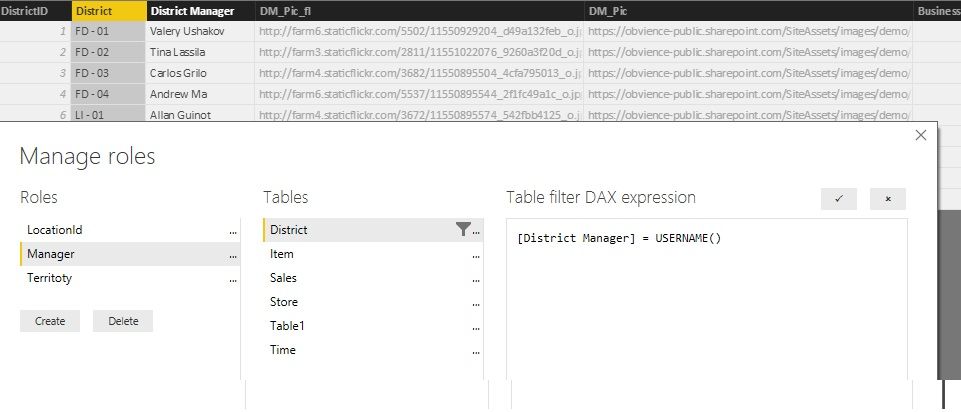
report with rls.jpg


One interesting thing to notice, when I pass value of username without spaces, token generated successfully and report with RLS works normally. So, how I should work with values with spaces?

1 ACCEPTED SOLUTION

Hello,


Spaces in the username are not allowed. As a workaround you can replace the spaces in the username for example with underscore ('_') and adjust the role DAX filter accordingly. You can also create a calculated column in the model that contains usernames without spaces.


Best regards

View solution in original post

3 REPLIES 3
Eric_Zhang
Microsoft Employee
Microsoft Employee

@agka

Thanks for reporting that. I can reproduce the same issue when the EffectiveUsername has any space, eg "Effective Username".


{   
    "accessLevel": "View",
    "identities": [     
        {      
            "username": "EffectiveUsername",
            "roles": [ "Role1", "Role2" ],
            "datasets": [ "fe0a1aeb-f6a4-4b27-a2d3-b5df3bb28bdc" ]
        }   
    ] 
} 


@yuryb

Do you have any comments on this? Is this a limitation or issue?

Hello,


Spaces in the username are not allowed. As a workaround you can replace the spaces in the username for example with underscore ('_') and adjust the role DAX filter accordingly. You can also create a calculated column in the model that contains usernames without spaces.


Best regards

agka
Regular Visitor

Thanks to everybody! that's helps!

Helpful resources

Announcements
Fabric Community Sticker Design Challenge Barcelona Carousel

Fabric Community Sticker Challenge - Barcelona 2026

If you love stickers, then you will definitely want to check out our community sticker challenge, Barcelona edition!

July Power BI Update Carousel

Power BI Monthly Update - July 2026

Check out the July 2026 Power BI update to learn about new features.

Power BI DataViz World Championships carousel

Power BI DataViz World Championships - June 2026

A new Power BI DataViz World Championship is coming this June! Don't miss out on submitting your entry.