cancel
Showing results for 
Search instead for 
Did you mean: 

July 7 - July 17 | Round 2 of the Power BI Dataviz World Championships. Don't miss your chance! Learn more

Reply
agka
Regular Visitor

PowerBi RLS with embedded analytics: spaces in username parameter

Hi, everybody!

I'm testing Power BI RLS with embedded analytics, and I perform steps from this article: https://powerbi.microsoft.com/ru-ru/documentation/powerbi-developer-embedded-rls/#applying-user-and-...

However I stuck on generating embed token, as I always get error code Bad request with message "Invalid effective username provided"


var generateTokenRequestParameters = new GenerateTokenRequest(
                    accessLevel: "view",                   
                    identities: new List<EffectiveIdentity> {
                        new EffectiveIdentity(username: "Andrey Ma", roles: new List<string> { "Manager" },
                        datasets: new List<string> { "3c1a920e-8389-44a7-8375-c179bb3b0fb2" }
                        )});
var tokenResponse = await client.Reports.GenerateTokenInGroupAsync(groupId, "f8288d00-81fb-4ffb-bd2f-c842079039f5", generateTokenRequestParameters);

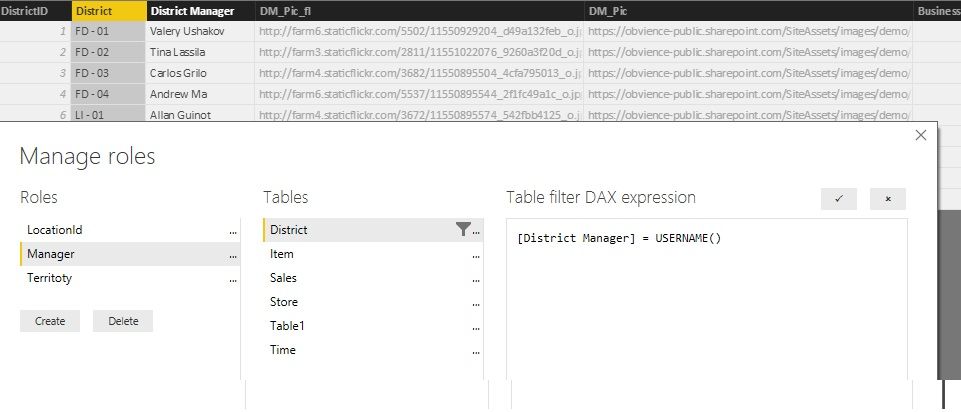
I created report with RLS from Retail Analysis Sample

report with rls.jpg


One interesting thing to notice, when I pass value of username without spaces, token generated successfully and report with RLS works normally. So, how I should work with values with spaces?

1 ACCEPTED SOLUTION

Hello,


Spaces in the username are not allowed. As a workaround you can replace the spaces in the username for example with underscore ('_') and adjust the role DAX filter accordingly. You can also create a calculated column in the model that contains usernames without spaces.


Best regards

View solution in original post

3 REPLIES 3
Eric_Zhang
Microsoft Employee
Microsoft Employee

@agka

Thanks for reporting that. I can reproduce the same issue when the EffectiveUsername has any space, eg "Effective Username".


{   
    "accessLevel": "View",
    "identities": [     
        {      
            "username": "EffectiveUsername",
            "roles": [ "Role1", "Role2" ],
            "datasets": [ "fe0a1aeb-f6a4-4b27-a2d3-b5df3bb28bdc" ]
        }   
    ] 
} 


@yuryb

Do you have any comments on this? Is this a limitation or issue?

Hello,


Spaces in the username are not allowed. As a workaround you can replace the spaces in the username for example with underscore ('_') and adjust the role DAX filter accordingly. You can also create a calculated column in the model that contains usernames without spaces.


Best regards

agka
Regular Visitor

Thanks to everybody! that's helps!

Helpful resources

Announcements
FabCon and SQLCon Barcelona 2026

FabCon & SQLCon – Barcelona 2026

Join us in Barcelona for FabCon and SQLCon, the Fabric, Power BI, SQL, and AI community event. Save €200 with code FABCMTY200.

July Power BI Update Carousel

Power BI Monthly Update - July 2026

Check out the July 2026 Power BI update to learn about new features.

60 days of Data Days Carousel

Data Days 2026

Join Data Days 2026: 60 days of free live/on-demand sessions, challenges, study groups, and certification opportunities.

Power BI DataViz World Championships carousel

Power BI DataViz World Championships - June 2026

A new Power BI DataViz World Championship is coming this June! Don't miss out on submitting your entry.