Join us at FabCon Atlanta from March 16 - 20, 2026, for the ultimate Fabric, Power BI, AI and SQL community-led event. Save $200 with code FABCOMM.
Register now!The Power BI Data Visualization World Championships is back! It's time to submit your entry. Live now!
Hi All,
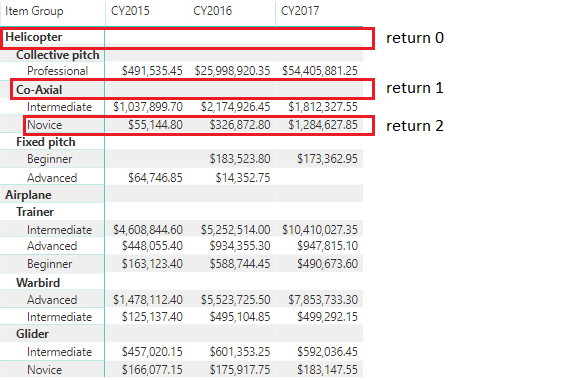
Considering a report that has a Power BI Matrix Visual, would it be possible to develop a Custom Visual that would know which level in the hierarchy was selected by the user? Or can I only do it by checking the highlighted values?
Thanks in advance for any feedback you could provide me.
@Anonymous - Yes, see my MM3TR&R - https://community.powerbi.com/t5/Quick-Measures-Gallery/Matrix-Measure-Total-Triple-Threat-Rock-amp-Roll/m-p/411443#M150
Also, ISINSCOPE is useful for this.
Thank you for the input.
I tried the ISINSCOPE function, but it doesn't work that well when you want to switch the legend of a clustered column chart.
I was planning to develop a new visual using d3/typescript, but then I don't know how to get the selected hierarchy level of the matrix.
The Power BI Data Visualization World Championships is back! It's time to submit your entry.
Check out the January 2026 Power BI update to learn about new features.
| User | Count |
|---|---|
| 4 | |
| 3 | |
| 2 | |
| 1 | |
| 1 |
| User | Count |
|---|---|
| 5 | |
| 4 | |
| 4 | |
| 3 | |
| 2 |