Join us at FabCon Atlanta from March 16 - 20, 2026, for the ultimate Fabric, Power BI, AI and SQL community-led event. Save $200 with code FABCOMM.
Register now!The Power BI Data Visualization World Championships is back! Get ahead of the game and start preparing now! Learn more
Hi All,
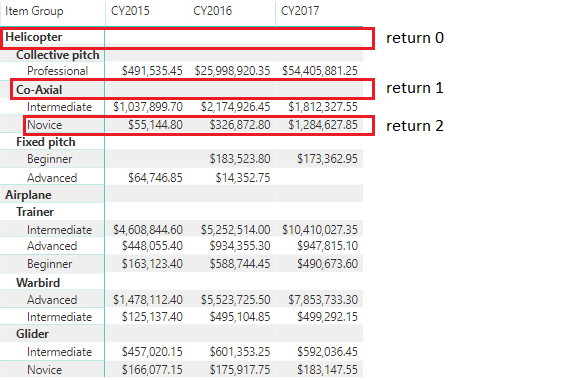
Considering a report that has a Power BI Matrix Visual, would it be possible to develop a Custom Visual that would know which level in the hierarchy was selected by the user? Or can I only do it by checking the highlighted values?
Thanks in advance for any feedback you could provide me.
@Anonymous - Yes, see my MM3TR&R - https://community.powerbi.com/t5/Quick-Measures-Gallery/Matrix-Measure-Total-Triple-Threat-Rock-amp-Roll/m-p/411443#M150
Also, ISINSCOPE is useful for this.
Thank you for the input.
I tried the ISINSCOPE function, but it doesn't work that well when you want to switch the legend of a clustered column chart.
I was planning to develop a new visual using d3/typescript, but then I don't know how to get the selected hierarchy level of the matrix.
The Power BI Data Visualization World Championships is back! Get ahead of the game and start preparing now!
| User | Count |
|---|---|
| 4 | |
| 2 | |
| 2 | |
| 1 | |
| 1 |
| User | Count |
|---|---|
| 4 | |
| 4 | |
| 4 | |
| 3 | |
| 2 |