Get certified for free when you join Fabric Data Days 2026 and dive into Fabric, Power BI, SQL, AI, and other essential data skills.
Join nowData Days is here! Join us now for 60+ days of learning, challenges, and connection. Learn more
I have the same issue as in https://community.powerbi.com/t5/Developer/Developer-Visual-is-missing/td-p/207939 but it doesn't work and I do it on Power BI online site.
(I downloaded https://github.com/Microsoft/PowerBI-visuals-sampleBarChart/tree/master/assets. Ran npm install, pbiviz start and it claims
info Building visual...
done build complete
info Starting server...
info Server listening on port 8080.
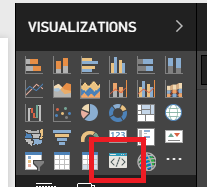
and I made sure Enable developer visual for testing is enabled but that icon won't show up when I open a PowerBI report for edit on https://app.powerbi.com. I do it in my private workspace.)
Any idea please?
Solved! Go to Solution.
It works on my side in the same Google Chrome version.
We'd recommend to try this solution out:
As an alternative solution we'd also recommend to try debug visual in other browsers.
Ignat Vilesov,
Software Engineer
Microsoft Power BI Custom Visuals
What web browser and what version of web browser do you use?
Ignat Vilesov,
Software Engineer
Microsoft Power BI Custom Visuals
Hi,
| Google Chrome | 66.0.3359.181 (Official Build) (64-bit) (cohort: Stable) |
| Revision | a10b9cedb40738cb152f8148ddab4891df876959-refs/branch-heads/3359@{#828} |
| OS | Windows |
| JavaScript | V8 6.6.346.32 |
Thank you
It works on my side in the same Google Chrome version.
We'd recommend to try this solution out:
As an alternative solution we'd also recommend to try debug visual in other browsers.
Ignat Vilesov,
Software Engineer
Microsoft Power BI Custom Visuals
Thank you, I followed the steps and now it works in my Chrome.
Don't miss out on Data Days, June 15 through August 7. Learn Fabric, Power BI, SQL, AI and more.
Check out the May 2026 Power BI update to learn about new features.
| User | Count |
|---|---|
| 2 | |
| 2 | |
| 1 | |
| 1 | |
| 1 |