cancel
Showing results for 
Search instead for 
Did you mean: 

Join the FabCon + SQLCon recap series. Up next: Power BI, Real-Time Intelligence, IQ and AI, and Data Factory take center stage. All sessions are available on-demand after the live show. Register now

Reply
IPS1
Regular Visitor

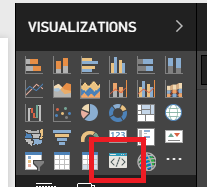
Developer visual icon is missing

I have the same issue as in https://community.powerbi.com/t5/Developer/Developer-Visual-is-missing/td-p/207939 but it doesn't work and I do it on Power BI online site.


(I downloaded https://github.com/Microsoft/PowerBI-visuals-sampleBarChart/tree/master/assets. Ran npm install, pbiviz start and it claims


info Building visual...
done build complete

info Starting server...
info Server listening on port 8080.


and I made sure Enable developer visual for testing is enabled but that icon won't show up when I open a PowerBI report for edit on https://app.powerbi.com. I do it in my private workspace.)


Any idea please?

1 ACCEPTED SOLUTION
v-viig
Community Champion
Community Champion

It works on my side in the same Google Chrome version.


We'd recommend to try this solution out:

  • Open Power BI service in Chrome
  • Press F12
  • Open the Console tab
  • Type "localStorage.clear()"
  • Press Enter
  • Go to Setting 
  • Open Developer tab
  • Turn on "Enable developer visual for testing"
  • Open any data set

image.png


As an alternative solution we'd also recommend to try debug visual in other browsers.


Ignat Vilesov,

Software Engineer


Microsoft Power BI Custom Visuals

pbicvsupport@microsoft.com

View solution in original post

4 REPLIES 4
v-viig
Community Champion
Community Champion

What web browser and what version of web browser do you use?


Ignat Vilesov,

Software Engineer


Microsoft Power BI Custom Visuals

pbicvsupport@microsoft.com

IPS1
Regular Visitor

Hi,


Google Chrome66.0.3359.181 (Official Build) (64-bit) (cohort: Stable)
Revisiona10b9cedb40738cb152f8148ddab4891df876959-refs/branch-heads/3359@{#828}
OSWindows
JavaScriptV8 6.6.346.32


Thank you

v-viig
Community Champion
Community Champion

It works on my side in the same Google Chrome version.


We'd recommend to try this solution out:

  • Open Power BI service in Chrome
  • Press F12
  • Open the Console tab
  • Type "localStorage.clear()"
  • Press Enter
  • Go to Setting 
  • Open Developer tab
  • Turn on "Enable developer visual for testing"
  • Open any data set

image.png


As an alternative solution we'd also recommend to try debug visual in other browsers.


Ignat Vilesov,

Software Engineer


Microsoft Power BI Custom Visuals

pbicvsupport@microsoft.com

IPS1
Regular Visitor

Thank you, I followed the steps and now it works in my Chrome.

Helpful resources

Announcements
April Power BI Update Carousel

Power BI Monthly Update - April 2026

Check out the April 2026 Power BI update to learn about new features.

New to Fabric survey Carousel

New to Fabric Survey

If you have recently started exploring Fabric, we'd love to hear how it's going. Your feedback can help with product improvements.

Power BI DataViz World Championships carousel

Power BI DataViz World Championships - June 2026

A new Power BI DataViz World Championship is coming this June! Don't miss out on submitting your entry.

FabCon and SQLCon Highlights Carousel

FabCon & SQLCon Highlights

Experience the highlights from FabCon & SQLCon, available live and on-demand starting April 14th.