Get certified for free when you join Fabric Data Days 2026 and dive into Fabric, Power BI, SQL, AI, and other essential data skills.
Join nowJuly 7 - July 17 | Round 2 of the Power BI Dataviz World Championships. Don't miss your chance! Learn more
Hi
I've been looking to add a dynamic average line to a scatter plot and can't seem to find a solution to something that seems quite basic.
Here's what I want to do:
Assume I have the following table:
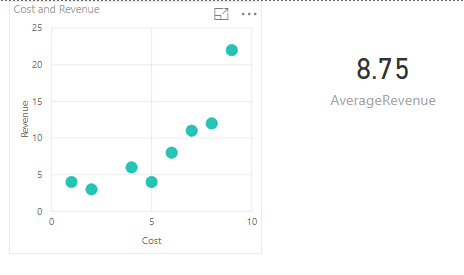
I created a scatter plot of my data and created a measure for the Average Revenue, which is displayed below.
I want to add a horizontal line which shows the Average Revenue to my scatter chart.
This is a simple example, but in real life my scatter chart has a bunch of filters and the average is recalculated automatically based on the selected filters. The Average Line needs to adjust when I change filtering options.
Is there an easy (or any) way to do this?
Thanks!
Use the Analytics tab (magnifying glass), there is a built-in option for an Average Line. Click visual, underneath VISUALIZATIONS click the magnifying glass.
Hi Greg
Yes, I have been looking for that option, but it's not there. The only options available are the trendlines and constant X and Y values. Average doesn't show up. My guess is it's because there are no Y values to average for any given X value (as each X value has a different Y value).
@Anonymous,
In the Visualizations pane, right-click [Revenue] dragged to Y Axis, and change the aggregation to Sum.
https://docs.microsoft.com/en-us/power-bi/service-aggregates
Thanks, but that does not display a dynamic Average of the selected filered values. I want the average line to change when I change selected filters. This average is static.
Join us in Barcelona for FabCon and SQLCon, the Fabric, Power BI, SQL, and AI community event. Save €200 with code FABCMTY200.
Join Fabric Data Days 2026: 60 days of free live/on-demand sessions, challenges, study groups, and certification opportunities.
| User | Count |
|---|---|
| 5 | |
| 3 | |
| 2 | |
| 2 | |
| 2 |