Get certified for free when you join Fabric Data Days 2026 and dive into Fabric, Power BI, SQL, AI, and other essential data skills.
Join nowData Days is here! Join us now for 60+ days of learning, challenges, and connection. Learn more
Hi
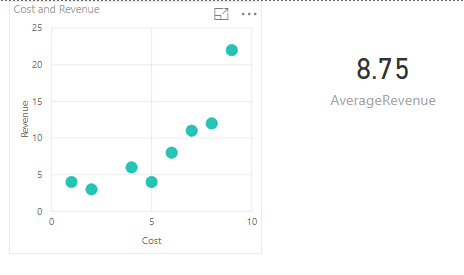
I've been looking to add a dynamic average line to a scatter plot and can't seem to find a solution to something that seems quite basic.
Here's what I want to do:
Assume I have the following table:
I created a scatter plot of my data and created a measure for the Average Revenue, which is displayed below.
I want to add a horizontal line which shows the Average Revenue to my scatter chart.
This is a simple example, but in real life my scatter chart has a bunch of filters and the average is recalculated automatically based on the selected filters. The Average Line needs to adjust when I change filtering options.
Is there an easy (or any) way to do this?
Thanks!
Use the Analytics tab (magnifying glass), there is a built-in option for an Average Line. Click visual, underneath VISUALIZATIONS click the magnifying glass.
Hi Greg
Yes, I have been looking for that option, but it's not there. The only options available are the trendlines and constant X and Y values. Average doesn't show up. My guess is it's because there are no Y values to average for any given X value (as each X value has a different Y value).
@Anonymous,
In the Visualizations pane, right-click [Revenue] dragged to Y Axis, and change the aggregation to Sum.
https://docs.microsoft.com/en-us/power-bi/service-aggregates
Thanks, but that does not display a dynamic Average of the selected filered values. I want the average line to change when I change selected filters. This average is static.
Don't miss out on Data Days, June 15 through August 7. Learn Fabric, Power BI, SQL, AI and more.
Check out the May 2026 Power BI update to learn about new features.
| User | Count |
|---|---|
| 2 | |
| 2 | |
| 1 | |
| 1 | |
| 1 |