Share feedback directly with Fabric product managers, participate in targeted research studies and influence the Fabric roadmap.
Sign up nowGet Fabric certified for FREE! Don't miss your chance! Learn more
Hey everyone,
I have a table with thosuands of parts that are received into our system.
Let's say Column A is the ItemID which is the part number and Column B is the Date that was received.
My goal is to check if a given part has entered into our system more than 5 times in a given 180 days period. So, at this point, I made something that works but it only checks for the last 180 days from today. I want to build something that can check for any 180 days for 5 batches received.
So, let's say if one part was received for 5 times between Jan 1st and July 1st for 5 times back in 2020, I want to flag that part.
Here is my current code with the 180 days from today thing.
#"Filtered Rows1" = Table.SelectRows(#"Filtered Rows", each [CREATEDDATETIME] > DateTime.LocalNow() - #duration(180, 0, 0, 0)),
#"Grouped Rows" = Table.Group(#"Filtered Rows1", {"ItemId", "ItemName"}, {{"Count", each Table.RowCount(_), Int64.Type}}),
#"Filtered Rows2" = Table.SelectRows(#"Grouped Rows", each [Count] >= 5)
Solved! Go to Solution.
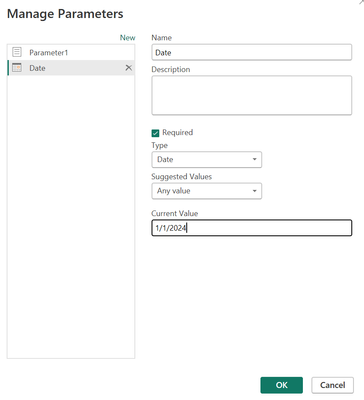
@power2 I would think something like this:
@power2 So, I would create a Parameter and then replace DateTime.LocalNow() with the name of that Parameter.
@Greg_Deckler
Thanks for the advise. In this case, how would that parameter look like? Can you be a little more specific?
@power2 I would think something like this:
Share feedback directly with Fabric product managers, participate in targeted research studies and influence the Fabric roadmap.
| User | Count |
|---|---|
| 3 | |
| 2 | |
| 2 | |
| 1 | |
| 1 |
| User | Count |
|---|---|
| 5 | |
| 4 | |
| 3 | |
| 3 | |
| 2 |