Get certified for free when you join Fabric Data Days 2026 and dive into Fabric, Power BI, SQL, AI, and other essential data skills.
Join nowJuly 28 - August 9 | Final Round of the Power BI Dataviz World Championships. This is your chance. Learn more
Hey everyone,
I have a table with thosuands of parts that are received into our system.
Let's say Column A is the ItemID which is the part number and Column B is the Date that was received.
My goal is to check if a given part has entered into our system more than 5 times in a given 180 days period. So, at this point, I made something that works but it only checks for the last 180 days from today. I want to build something that can check for any 180 days for 5 batches received.
So, let's say if one part was received for 5 times between Jan 1st and July 1st for 5 times back in 2020, I want to flag that part.
Here is my current code with the 180 days from today thing.
#"Filtered Rows1" = Table.SelectRows(#"Filtered Rows", each [CREATEDDATETIME] > DateTime.LocalNow() - #duration(180, 0, 0, 0)),
#"Grouped Rows" = Table.Group(#"Filtered Rows1", {"ItemId", "ItemName"}, {{"Count", each Table.RowCount(_), Int64.Type}}),
#"Filtered Rows2" = Table.SelectRows(#"Grouped Rows", each [Count] >= 5)
Solved! Go to Solution.
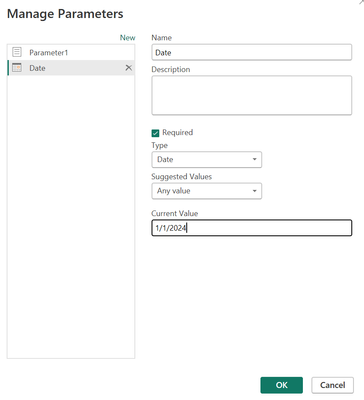
@power2 I would think something like this:
@power2 So, I would create a Parameter and then replace DateTime.LocalNow() with the name of that Parameter.
@Greg_Deckler
Thanks for the advise. In this case, how would that parameter look like? Can you be a little more specific?
@power2 I would think something like this:
Join us in Barcelona for FabCon and SQLCon, the Fabric, Power BI, SQL, and AI community event. Save €200 with code FABCMTY200.
If you love stickers, then you will definitely want to check out our community sticker challenge, Barcelona edition!
Check out the July 2026 Power BI update to learn about new features.
| User | Count |
|---|---|
| 2 | |
| 1 | |
| 1 | |
| 1 | |
| 1 |
| User | Count |
|---|---|
| 4 | |
| 2 | |
| 1 | |
| 1 | |
| 1 |