cancel
Showing results for 
Search instead for 
Did you mean: 

The Power BI Data Visualization World Championships is back! Get ahead of the game and start preparing now! Learn more

Reply
power2
Frequent Visitor

180 days loop

Hey everyone,


I have a table with thosuands of parts that are received into our system. 

Let's say Column A is the ItemID which is the part number and Column B is the Date that was received.


My goal is to check if a given part has entered into our system more than 5 times in a given 180 days period. So, at this point, I made something that works but it only checks for the last 180 days from today. I want to build something that can check for any 180 days for 5 batches received.


So, let's say if one part was received for 5 times between Jan 1st and July 1st for 5 times back in 2020, I want to flag that part.

Here is my current code with the 180 days from today thing.


#"Filtered Rows1" = Table.SelectRows(#"Filtered Rows", each [CREATEDDATETIME] > DateTime.LocalNow() - #duration(180, 0, 0, 0)),
#"Grouped Rows" = Table.Group(#"Filtered Rows1", {"ItemId", "ItemName"}, {{"Count", each Table.RowCount(_), Int64.Type}}),
#"Filtered Rows2" = Table.SelectRows(#"Grouped Rows", each [Count] >= 5)

1 ACCEPTED SOLUTION

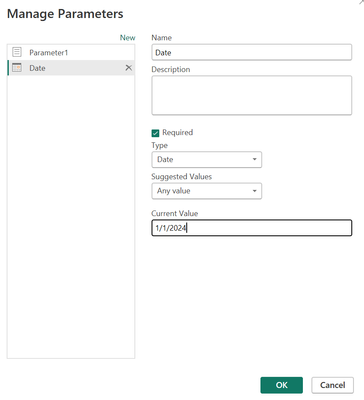
@power2 I would think something like this:

Greg_Deckler_0-1709852439229.png


Follow on LinkedIn
@ me in replies or I'll lose your thread!!!
Instead of a Kudo, please vote for this idea
Become an expert!: Enterprise DNA
External Tools: MSHGQM
YouTube Channel!: Microsoft Hates Greg
Latest book!:
DAX For Humans

DAX is easy, CALCULATE makes DAX hard...

View solution in original post

4 REPLIES 4
Greg_Deckler
Community Champion
Community Champion

@power2 So, I would create a Parameter and then replace DateTime.LocalNow() with the name of that Parameter.


Follow on LinkedIn
@ me in replies or I'll lose your thread!!!
Instead of a Kudo, please vote for this idea
Become an expert!: Enterprise DNA
External Tools: MSHGQM
YouTube Channel!: Microsoft Hates Greg
Latest book!:
DAX For Humans

DAX is easy, CALCULATE makes DAX hard...

@Greg_Deckler 
Thanks for the advise. In this case, how would that parameter look like? Can you be a little more specific?

@power2 I would think something like this:

Greg_Deckler_0-1709852439229.png


Follow on LinkedIn
@ me in replies or I'll lose your thread!!!
Instead of a Kudo, please vote for this idea
Become an expert!: Enterprise DNA
External Tools: MSHGQM
YouTube Channel!: Microsoft Hates Greg
Latest book!:
DAX For Humans

DAX is easy, CALCULATE makes DAX hard...

@Greg_Deckler 
Thanks. I will give this a try.

Helpful resources

Announcements
Power BI DataViz World Championships

Power BI Dataviz World Championships

The Power BI Data Visualization World Championships is back! Get ahead of the game and start preparing now!

December 2025 Power BI Update Carousel

Power BI Monthly Update - December 2025

Check out the December 2025 Power BI Holiday Recap!

FabCon Atlanta 2026 carousel

FabCon Atlanta 2026

Join us at FabCon Atlanta, March 16-20, for the ultimate Fabric, Power BI, AI and SQL community-led event. Save $200 with code FABCOMM.