This is best Fabric, Power BI, SQL and AI community event. How do we know? The last event sold out! Save €200 with code FABCMTY200.
Register nowA new Data Days event is coming soon! This time we’re going bigger than ever. Fabric, Power BI, SQL, AI and more. Don't miss out.
Hi,
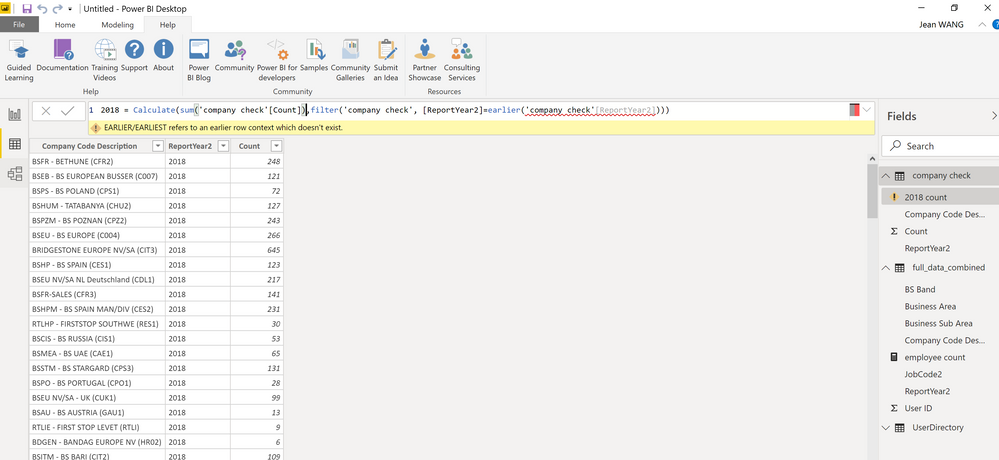
I try to create a new column in query editor however, the earlier function generates an error.
Thanks for help!arlier function doesn't work.
Solved! Go to Solution.
@Anonymous - There's a lot going wrong here. First, EARLIER is DAX and thus does not work in Query Editor because Query Editor uses M code, not DAX. Two, that screen shot is not the Query Editor. Third, it looks like you are creating a measure and not a calculated column and that's likely why you don't have an earlier context for EARLIER.
Thanks! Indeed I created the DAX formula in Power BI data view, not in query editor. I thought i have created a new column, but you are right, it seems to be a measure formula. Now the earlier function works when I create it under a new column.
@Anonymous , hope you are creating a column, not a measure.
Try like this
new column = , sumx(filter(Table,Table[ID] =earlier(Table[ID])) ,Table[value])
Sign up to receive a private message when registration opens and key events begin.
If you have recently started exploring Fabric, we'd love to hear how it's going. Your feedback can help with product improvements.
| User | Count |
|---|---|
| 32 | |
| 26 | |
| 23 | |
| 20 | |
| 15 |
| User | Count |
|---|---|
| 64 | |
| 41 | |
| 28 | |
| 22 | |
| 22 |