Learn from the best! Meet the four finalists headed to the FINALS of the Power BI Dataviz World Championships! Register now
Hi,
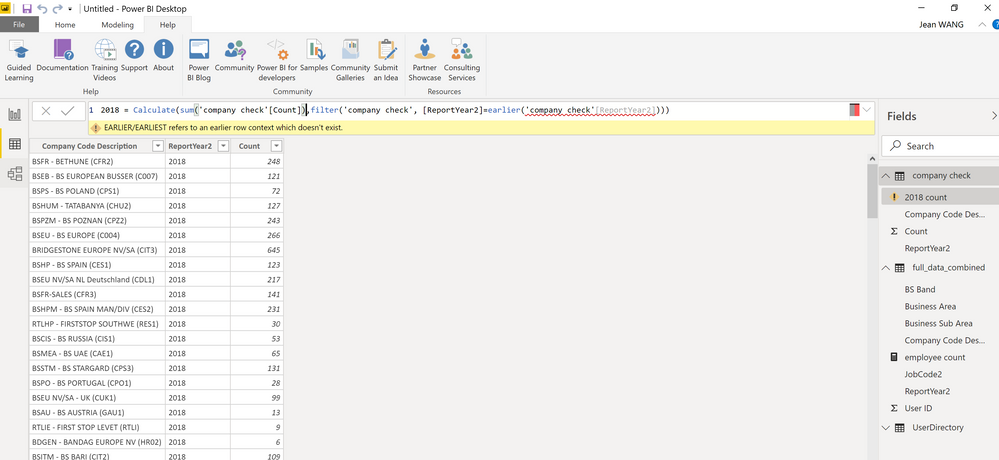
I try to create a new column in query editor however, the earlier function generates an error.
Thanks for help!arlier function doesn't work.
Solved! Go to Solution.
@Anonymous - There's a lot going wrong here. First, EARLIER is DAX and thus does not work in Query Editor because Query Editor uses M code, not DAX. Two, that screen shot is not the Query Editor. Third, it looks like you are creating a measure and not a calculated column and that's likely why you don't have an earlier context for EARLIER.
Thanks! Indeed I created the DAX formula in Power BI data view, not in query editor. I thought i have created a new column, but you are right, it seems to be a measure formula. Now the earlier function works when I create it under a new column.
@Anonymous , hope you are creating a column, not a measure.
Try like this
new column = , sumx(filter(Table,Table[ID] =earlier(Table[ID])) ,Table[value])
A new Power BI DataViz World Championship is coming this June! Don't miss out on submitting your entry.
Share feedback directly with Fabric product managers, participate in targeted research studies and influence the Fabric roadmap.
| User | Count |
|---|---|
| 45 | |
| 35 | |
| 30 | |
| 15 | |
| 15 |
| User | Count |
|---|---|
| 58 | |
| 55 | |
| 38 | |
| 21 | |
| 21 |