Don't miss your chance to take exam DP-600 or DP-700 on us!
Request nowLearn from the best! Meet the four finalists headed to the FINALS of the Power BI Dataviz World Championships! Register now
Hi,
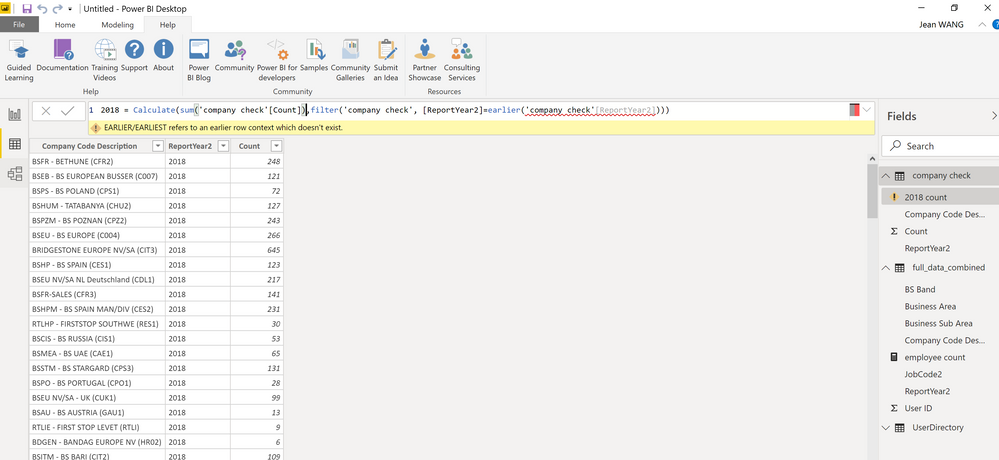
I try to create a new column in query editor however, the earlier function generates an error.
Thanks for help!arlier function doesn't work.
Solved! Go to Solution.
@Anonymous - There's a lot going wrong here. First, EARLIER is DAX and thus does not work in Query Editor because Query Editor uses M code, not DAX. Two, that screen shot is not the Query Editor. Third, it looks like you are creating a measure and not a calculated column and that's likely why you don't have an earlier context for EARLIER.
Thanks! Indeed I created the DAX formula in Power BI data view, not in query editor. I thought i have created a new column, but you are right, it seems to be a measure formula. Now the earlier function works when I create it under a new column.
@Anonymous , hope you are creating a column, not a measure.
Try like this
new column = , sumx(filter(Table,Table[ID] =earlier(Table[ID])) ,Table[value])
Share feedback directly with Fabric product managers, participate in targeted research studies and influence the Fabric roadmap.
Check out the February 2026 Power BI update to learn about new features.
| User | Count |
|---|---|
| 50 | |
| 40 | |
| 37 | |
| 14 | |
| 14 |
| User | Count |
|---|---|
| 85 | |
| 69 | |
| 37 | |
| 28 | |
| 27 |