Get certified for free when you join Fabric Data Days 2026 and dive into Fabric, Power BI, SQL, AI, and other essential data skills.
Join nowData Days is here! Join us now for 60+ days of learning, challenges, and connection. Learn more
Hi,
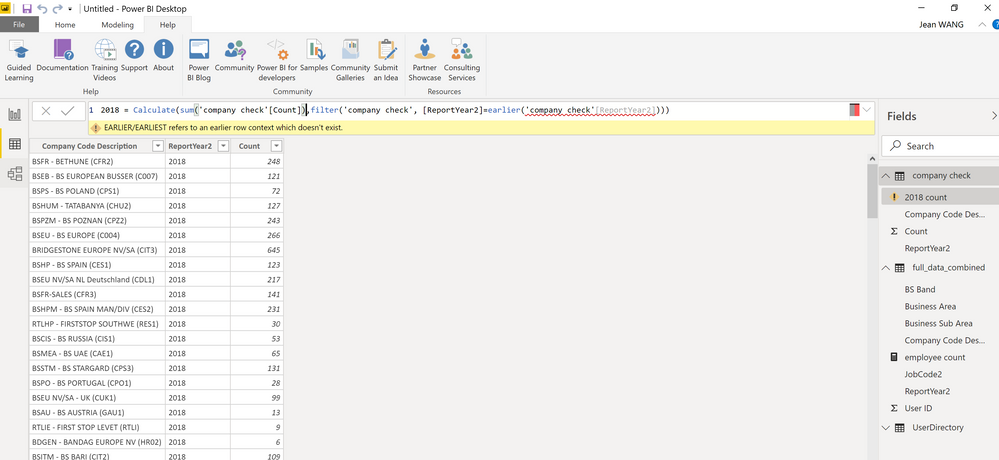
I try to create a new column in query editor however, the earlier function generates an error.
Thanks for help!arlier function doesn't work.
Solved! Go to Solution.
@Anonymous - There's a lot going wrong here. First, EARLIER is DAX and thus does not work in Query Editor because Query Editor uses M code, not DAX. Two, that screen shot is not the Query Editor. Third, it looks like you are creating a measure and not a calculated column and that's likely why you don't have an earlier context for EARLIER.
Thanks! Indeed I created the DAX formula in Power BI data view, not in query editor. I thought i have created a new column, but you are right, it seems to be a measure formula. Now the earlier function works when I create it under a new column.
@Anonymous , hope you are creating a column, not a measure.
Try like this
new column = , sumx(filter(Table,Table[ID] =earlier(Table[ID])) ,Table[value])
Don't miss out on Data Days, June 15 through August 7. Learn Fabric, Power BI, SQL, AI and more.
Check out the May 2026 Power BI update to learn about new features.
| User | Count |
|---|---|
| 23 | |
| 23 | |
| 20 | |
| 18 | |
| 14 |
| User | Count |
|---|---|
| 58 | |
| 51 | |
| 41 | |
| 30 | |
| 24 |