Don't miss your chance to take the Fabric Data Engineer (DP-700) exam on us!
Learn moreWe've captured the moments from FabCon & SQLCon that everyone is talking about, and we are bringing them to the community, live and on-demand. Starts on April 14th. Register now
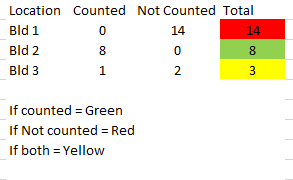
Hello, I need to set conditional format to show 3 different colors as shown below in a small sample data but cannot figure out how to do it in Power BI. Can someone please help? Thanks in advance for your time.
Solved! Go to Solution.
@tracyhopaulson, try this measure:
Formatting Color =
SWITCH (
TRUE (),
[Counted] = 0
&& [Not Counted] > 0, "Red",
[Counted] > 0
&& [Not Counted] = 0, "Green",
[Counted] > 0
&& [Not Counted] > 0, "Yellow"
)
Steps to apply:
1. Conditional formatting > Background color
2. Format by = Field value
3. Based on field = Formatting Color
Instead of the color names, you can use color codes (e.g., #FF0000).
Proud to be a Super User!
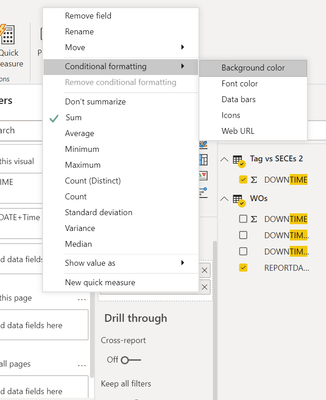
@tracyhopaulson You can click the down arrow button on the required field and then select Conditional Formatting for defining formatting as per your requirement.
Here is a detailed article if you want to learn different ways: https://www.mssqltips.com/sqlservertip/6265/power-bi-conditional-formatting-for-matrix-and-table-vis...
If this post helps then please consider Accept it as the solution to help the other members find it more quickly.
Cheers!
@tracyhopaulson, try this measure:
Formatting Color =
SWITCH (
TRUE (),
[Counted] = 0
&& [Not Counted] > 0, "Red",
[Counted] > 0
&& [Not Counted] = 0, "Green",
[Counted] > 0
&& [Not Counted] > 0, "Yellow"
)
Steps to apply:
1. Conditional formatting > Background color
2. Format by = Field value
3. Based on field = Formatting Color
Instead of the color names, you can use color codes (e.g., #FF0000).
Proud to be a Super User!
Thank you so much! This works 🙂
If you have recently started exploring Fabric, we'd love to hear how it's going. Your feedback can help with product improvements.
A new Power BI DataViz World Championship is coming this June! Don't miss out on submitting your entry.
Share feedback directly with Fabric product managers, participate in targeted research studies and influence the Fabric roadmap.
| User | Count |
|---|---|
| 52 | |
| 38 | |
| 37 | |
| 19 | |
| 17 |
| User | Count |
|---|---|
| 69 | |
| 64 | |
| 37 | |
| 32 | |
| 21 |