cancel
Showing results for 
Search instead for 
Did you mean: 

The Power BI Data Visualization World Championships is back! Get ahead of the game and start preparing now! Learn more

Reply
tracyhopaulson
Resolver I
Resolver I

conditional formatting

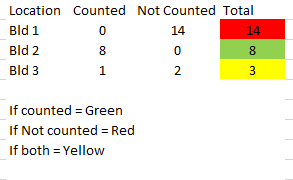
Hello, I need to set conditional format to show 3 different colors as shown below in a small sample data but cannot figure out how to do it in Power BI. Can someone please help?   Thanks in advance for your time.


Capture.PNG

1 ACCEPTED SOLUTION
DataInsights
Super User
Super User

@tracyhopaulson, try this measure:


Formatting Color =
SWITCH (
    TRUE (),
    [Counted] = 0
        && [Not Counted] > 0, "Red",
    [Counted] > 0
        && [Not Counted] = 0, "Green",
    [Counted] > 0
        && [Not Counted] > 0, "Yellow"
)


Steps to apply:


1. Conditional formatting > Background color

2. Format by = Field value

3. Based on field = Formatting Color


Instead of the color names, you can use color codes (e.g., #FF0000).


Did I answer your question? Mark my post as a solution!

Proud to be a Super User!


View solution in original post

3 REPLIES 3
amitjzaveri
Resolver II
Resolver II

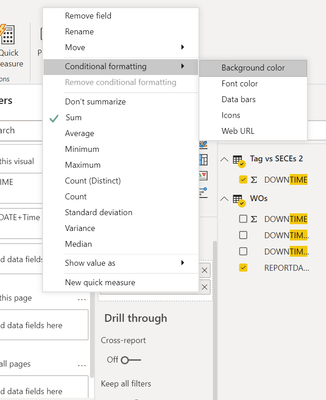
@tracyhopaulson  You can click the down arrow button on the required field and then select Conditional Formatting for defining formatting as per your requirement.


bi.png


Here is a detailed article if you want to learn different ways: https://www.mssqltips.com/sqlservertip/6265/power-bi-conditional-formatting-for-matrix-and-table-vis...


If this post helps then please consider Accept it as the solution to help the other members find it more quickly.


Cheers!

DataInsights
Super User
Super User

@tracyhopaulson, try this measure:


Formatting Color =
SWITCH (
    TRUE (),
    [Counted] = 0
        && [Not Counted] > 0, "Red",
    [Counted] > 0
        && [Not Counted] = 0, "Green",
    [Counted] > 0
        && [Not Counted] > 0, "Yellow"
)


Steps to apply:


1. Conditional formatting > Background color

2. Format by = Field value

3. Based on field = Formatting Color


Instead of the color names, you can use color codes (e.g., #FF0000).


Did I answer your question? Mark my post as a solution!

Proud to be a Super User!


Thank you so much! This works 🙂

Helpful resources

Announcements
Power BI DataViz World Championships

Power BI Dataviz World Championships

The Power BI Data Visualization World Championships is back! Get ahead of the game and start preparing now!

December 2025 Power BI Update Carousel

Power BI Monthly Update - December 2025

Check out the December 2025 Power BI Holiday Recap!

FabCon Atlanta 2026 carousel

FabCon Atlanta 2026

Join us at FabCon Atlanta, March 16-20, for the ultimate Fabric, Power BI, AI and SQL community-led event. Save $200 with code FABCOMM.