This is best Fabric, Power BI, SQL and AI community event. How do we know? The last event sold out! Save €200 with code FABCMTY200.
Register nowThe Fabric community is upgrading! Read all of the details including the timeline and what you can expect. Learn more
Hi everyone,
I wonder if someone could clarify for me please. I am using PowerBi to report on some Dynamics data. On a quote entity in dynamics, you have the status e.g Draft, Active, Closed etc.
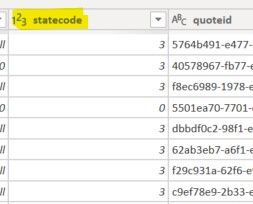
In my quote entity table, the status is held as the code but in my BI Visuals, the code of course means nothing to end users viewing the data. Is there any way to resolve the code group to the description? Having a chart with headings of 0, 1, 2 etc is meaningless.
Thanks
Solved! Go to Solution.
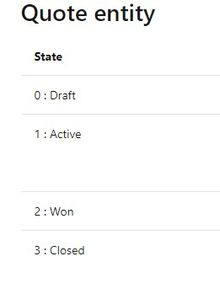
Hi, you can have a dim table to the screenshot you put, 2 columns, one is the code, the other is the Status. Create relationship with your dynamic table, and write DAX to display status instead of code. Or add a calculated column to display the Status, up to you.
Join us in Barcelona for FabCon and SQLCon, the Fabric, Power BI, SQL, and AI community event. Save €200 with code FABCMTY200.
| User | Count |
|---|---|
| 24 | |
| 22 | |
| 20 | |
| 18 | |
| 14 |
| User | Count |
|---|---|
| 44 | |
| 37 | |
| 23 | |
| 21 | |
| 20 |