Join us at FabCon Atlanta from March 16 - 20, 2026, for the ultimate Fabric, Power BI, AI and SQL community-led event. Save $200 with code FABCOMM.
Register now!Learn from the best! Meet the four finalists headed to the FINALS of the Power BI Dataviz World Championships! Register now
Hi everyone,
I wonder if someone could clarify for me please. I am using PowerBi to report on some Dynamics data. On a quote entity in dynamics, you have the status e.g Draft, Active, Closed etc.
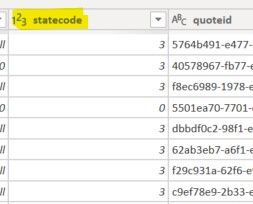
In my quote entity table, the status is held as the code but in my BI Visuals, the code of course means nothing to end users viewing the data. Is there any way to resolve the code group to the description? Having a chart with headings of 0, 1, 2 etc is meaningless.
Thanks
Solved! Go to Solution.
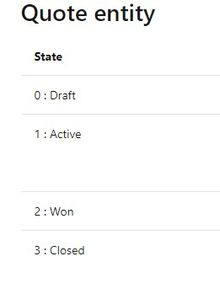
Hi, you can have a dim table to the screenshot you put, 2 columns, one is the code, the other is the Status. Create relationship with your dynamic table, and write DAX to display status instead of code. Or add a calculated column to display the Status, up to you.
Share feedback directly with Fabric product managers, participate in targeted research studies and influence the Fabric roadmap.
Check out the February 2026 Power BI update to learn about new features.
| User | Count |
|---|---|
| 53 | |
| 47 | |
| 30 | |
| 15 | |
| 14 |
| User | Count |
|---|---|
| 88 | |
| 73 | |
| 39 | |
| 26 | |
| 25 |