Get certified for free when you join Fabric Data Days 2026 and dive into Fabric, Power BI, SQL, AI, and other essential data skills.
Join nowData Days is here! Join us now for 60+ days of learning, challenges, and connection. Learn more
Hi everyone,
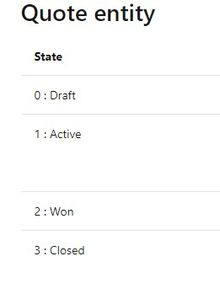
I wonder if someone could clarify for me please. I am using PowerBi to report on some Dynamics data. On a quote entity in dynamics, you have the status e.g Draft, Active, Closed etc.
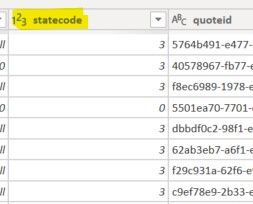
In my quote entity table, the status is held as the code but in my BI Visuals, the code of course means nothing to end users viewing the data. Is there any way to resolve the code group to the description? Having a chart with headings of 0, 1, 2 etc is meaningless.
Thanks
Solved! Go to Solution.
Hi, you can have a dim table to the screenshot you put, 2 columns, one is the code, the other is the Status. Create relationship with your dynamic table, and write DAX to display status instead of code. Or add a calculated column to display the Status, up to you.
Don't miss out on Data Days, June 15 through August 7. Learn Fabric, Power BI, SQL, AI and more.
Check out the May 2026 Power BI update to learn about new features.
| User | Count |
|---|---|
| 23 | |
| 23 | |
| 20 | |
| 18 | |
| 14 |
| User | Count |
|---|---|
| 58 | |
| 51 | |
| 40 | |
| 30 | |
| 24 |