This time we’re going bigger than ever. Fabric, Power BI, SQL, AI and more. We're covering it all. You won't want to miss it.
Learn moreGet Fabric Certified for FREE during AI Skills Fest. This week only. Secure your voucher now.
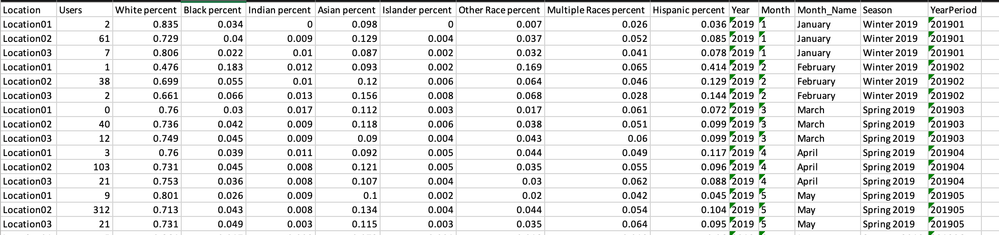
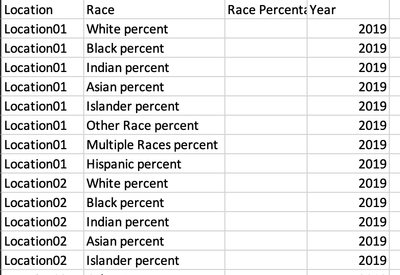
I am working with a set of demographic data and my data source is on SQL Server. To properly analyze and visualize it in Power BI, I need to transpose some columns into rows, preferably in a new table. I appreciate any recommendations to do that either in Power BI or in SQL server.
Here is how my data currently looks like:
This is how I would like it to look like:
I have imported a portion of the data into Excel to provide the above screenshots.
Solved! Go to Solution.
@monibuw , Use unpivot in power quey
https://radacad.com/pivot-and-unpivot-with-power-bi
My Video
https://www.youtube.com/watch?v=2HjkBtxSM0g
@monibuw , Use unpivot in power quey
Check out the May 2026 Power BI update to learn about new features.
Sign up to receive a private message when registration opens and key events begin.
If you have recently started exploring Fabric, we'd love to hear how it's going. Your feedback can help with product improvements.
| User | Count |
|---|---|
| 23 | |
| 21 | |
| 21 | |
| 21 | |
| 16 |
| User | Count |
|---|---|
| 56 | |
| 55 | |
| 43 | |
| 26 | |
| 24 |