cancel
Showing results for 
Search instead for 
Did you mean: 

The Power BI Data Visualization World Championships is back! It's time to submit your entry. Live now!

Reply
monibuw
Regular Visitor

Transpose Some Columns to Rows - SQL Server source

I am working with a set of demographic data and my data source is on SQL Server. To properly analyze and visualize it in Power BI, I need to transpose some columns into rows, preferably in a new table. I appreciate any recommendations to do that either in Power BI or in SQL server.


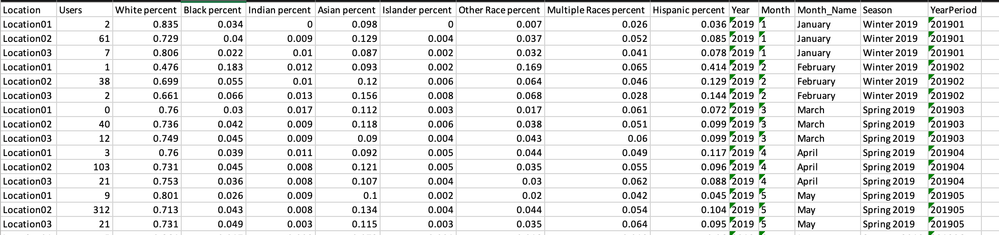
Here is how my data currently looks like:

Screen Shot 2021-04-15 at 1.36.21 AM.png


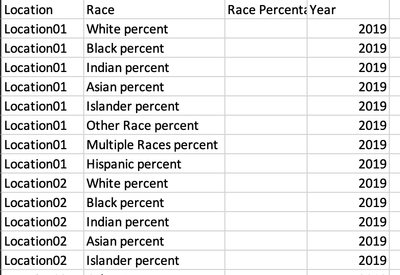
This is how I would like it to look like: 

Screen Shot 2021-04-15 at 1.36.07 AM.png


I have imported a portion of the data into Excel to provide the above screenshots.

1 ACCEPTED SOLUTION
amitchandak
Super User
Super User

@monibuw , Use unpivot in power quey 

https://radacad.com/pivot-and-unpivot-with-power-bi
My Video

https://www.youtube.com/watch?v=2HjkBtxSM0g

Share with Power BI Enthusiasts: Full Power BI Video (20 Hours) YouTube
Microsoft Fabric Series 60+ Videos YouTube
Microsoft Fabric Hindi End to End YouTube

View solution in original post

1 REPLY 1
amitchandak
Super User
Super User

@monibuw , Use unpivot in power quey 

https://radacad.com/pivot-and-unpivot-with-power-bi
My Video

https://www.youtube.com/watch?v=2HjkBtxSM0g

Share with Power BI Enthusiasts: Full Power BI Video (20 Hours) YouTube
Microsoft Fabric Series 60+ Videos YouTube
Microsoft Fabric Hindi End to End YouTube

Helpful resources

Announcements
December 2025 Power BI Update Carousel

Power BI Monthly Update - December 2025

Check out the December 2025 Power BI Holiday Recap!

FabCon Atlanta 2026 carousel

FabCon Atlanta 2026

Join us at FabCon Atlanta, March 16-20, for the ultimate Fabric, Power BI, AI and SQL community-led event. Save $200 with code FABCOMM.