This is best Fabric, Power BI, SQL and AI community event. How do we know? The last event sold out! Save €200 with code FABCMTY200.
Register nowA new Data Days event is coming soon! This time we’re going bigger than ever. Fabric, Power BI, SQL, AI and more. Don't miss out.
I am working with a set of demographic data and my data source is on SQL Server. To properly analyze and visualize it in Power BI, I need to transpose some columns into rows, preferably in a new table. I appreciate any recommendations to do that either in Power BI or in SQL server.
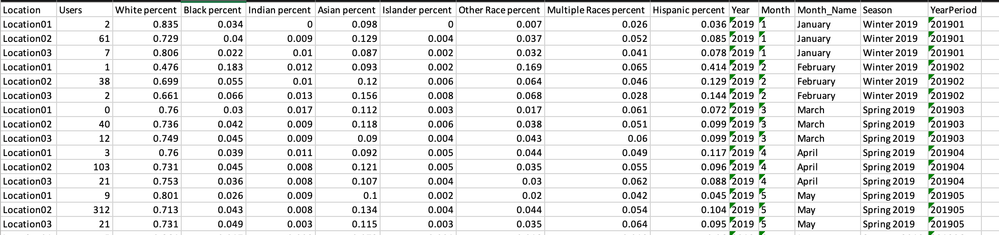
Here is how my data currently looks like:
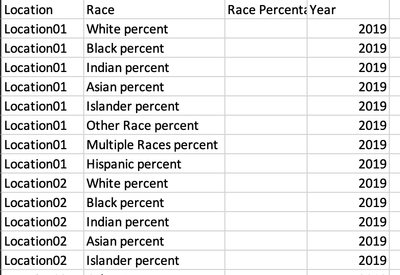
This is how I would like it to look like:
I have imported a portion of the data into Excel to provide the above screenshots.
Solved! Go to Solution.
@monibuw , Use unpivot in power quey
https://radacad.com/pivot-and-unpivot-with-power-bi
My Video
https://www.youtube.com/watch?v=2HjkBtxSM0g
@monibuw , Use unpivot in power quey
Check out the May 2026 Power BI update to learn about new features.
Sign up to receive a private message when registration opens and key events begin.
If you have recently started exploring Fabric, we'd love to hear how it's going. Your feedback can help with product improvements.
| User | Count |
|---|---|
| 31 | |
| 26 | |
| 23 | |
| 22 | |
| 15 |
| User | Count |
|---|---|
| 62 | |
| 47 | |
| 28 | |
| 24 | |
| 21 |