Get certified for free when you join Fabric Data Days 2026 and dive into Fabric, Power BI, SQL, AI, and other essential data skills.
Join nowJuly 28 - August 9 | Final Round of the Power BI Dataviz World Championships. This is your chance. Learn more
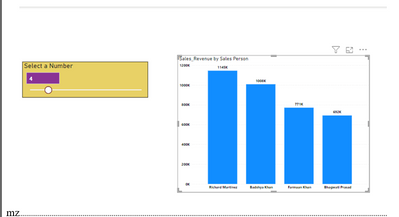
i have created the foolowing visual which shows the topN sales person based on the slicer value.
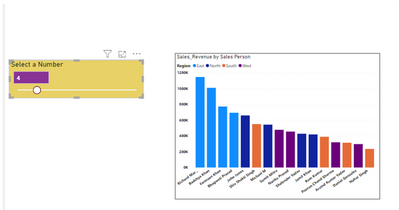
But as soon as i put region in legends, it no longer shows me top 4 sales person overall but top 4 for all the regions.
I would like to use region in legends but need only top 4 sales person irrespective of the region and not for all regions. Here is the what i am getting
Please help with a solution
Solved! Go to Solution.
1-Create a meaasure:
SalesTotal = SUM(PersonRegionTable[sales])2-Create a rank measure:
RankMEasure =
RANKX ( ALLSELECTED ( PersonRegionTable ), [SalesTotal] )3-Create a measure for your slicer value which is selected:
TOPNVALUE = SELECTEDVALUE(TOPNTABLE[VALUES])4-Create a measure as filter on the visual:
FILTERMeasure =
IF ( [RankMEasure] <= [TOPNVALUE], 1, BLANK () )
Then put the [FilterMeasure] on your Visual as Filter on this visual on FilterPane and set it equals to 1.
If this helps you, accept it as a solution.
Regards,
Loran
Hi @MeghnaZutshi ,
If you use the Filter Pane TOPN option, it works as you expect.
Btw, if you need to use your approach, please share a sample .pbix then we can fix your measure.
Regards,
Loran
Hi @MohammadLoran25 ,
Thanks for the solution. TOPN in filter pane works fine but i need TOPN to be based on the parameter chosen by the user in the slicer. I have attached my file, can you please help me with the solution .
@MohammadLoran25
Not able to upload file here. here are my measures:
It should show region as well which is there in the legends
1-Create a meaasure:
SalesTotal = SUM(PersonRegionTable[sales])2-Create a rank measure:
RankMEasure =
RANKX ( ALLSELECTED ( PersonRegionTable ), [SalesTotal] )3-Create a measure for your slicer value which is selected:
TOPNVALUE = SELECTEDVALUE(TOPNTABLE[VALUES])4-Create a measure as filter on the visual:
FILTERMeasure =
IF ( [RankMEasure] <= [TOPNVALUE], 1, BLANK () )
Then put the [FilterMeasure] on your Visual as Filter on this visual on FilterPane and set it equals to 1.
If this helps you, accept it as a solution.
Regards,
Loran
If you love stickers, then you will definitely want to check out our community sticker challenge, Barcelona edition!
Check out the July 2026 Power BI update to learn about new features.
| User | Count |
|---|---|
| 30 | |
| 28 | |
| 23 | |
| 21 | |
| 19 |
| User | Count |
|---|---|
| 41 | |
| 32 | |
| 18 | |
| 18 | |
| 15 |