cancel
Showing results for 
Search instead for 
Did you mean: 

The Power BI Data Visualization World Championships is back! Get ahead of the game and start preparing now! Learn more

Reply
MeghnaZutshi
Frequent Visitor

TopN

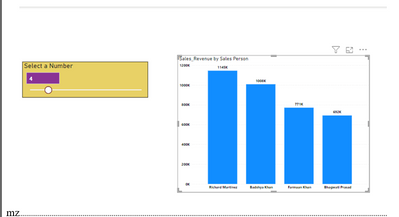
i have created the foolowing visual which shows the topN sales person based on the slicer value.

MeghnaZutshi_0-1682008108673.png


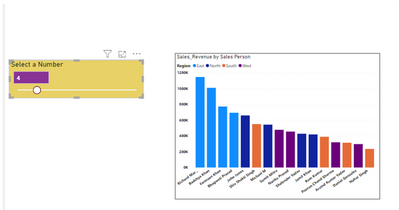
But as soon as i put region in legends, it no longer shows me top 4 sales person overall but top 4 for all the regions.


I would like to use region in legends but need only top 4 sales person irrespective of the region and not for all regions. Here is the what i am getting

MeghnaZutshi_1-1682008234304.png

Please help with a solution


1 ACCEPTED SOLUTION

@MeghnaZutshi ,


1-Create a meaasure:

SalesTotal = SUM(PersonRegionTable[sales])

2-Create a rank measure:

RankMEasure =
RANKX ( ALLSELECTED ( PersonRegionTable ), [SalesTotal] )

3-Create a measure for your slicer value which is selected:

TOPNVALUE = SELECTEDVALUE(TOPNTABLE[VALUES])

4-Create a measure as filter on the visual:

FILTERMeasure =
IF ( [RankMEasure] <= [TOPNVALUE], 1, BLANK () )


Then put the [FilterMeasure] on your Visual as Filter on this visual on FilterPane and set it equals to 1.


If this helps you, accept it as a solution.

Regards,

Loran

View solution in original post

5 REPLIES 5
MohammadLoran25
Solution Sage
Solution Sage

Hi @MeghnaZutshi ,

If you use the Filter Pane TOPN option, it works as you expect.

Btw, if you need to use your approach, please share a sample .pbix then we can fix your measure.


Regards,

Loran

Hi @MohammadLoran25 ,

Thanks for the solution. TOPN in filter pane works fine but i need TOPN to be based on the parameter chosen by the user in the slicer. I have attached my file, can you please help me with the solution .

@MohammadLoran25 
Not able to upload file here. here are my measures:


TopN_SelectedValue =

VAR SelectedTop= SELECTEDVALUE('Top N'[Top N])
RETURN

switch(TRUE(),
SelectedTop=0,[salesTotal],

Rankx(
    ALLSELECTED('Sales_data'[Sales Person]),
    [salesTotal]
)<=SelectedTop,
[salesTotal]

)
Top N'[Top N] is the parameter name
 
I want a solution like this but without using TopN in filter pane:
MeghnaZutshi_0-1682060616813.png


It should show region as well which is there in the legends

@MeghnaZutshi ,


1-Create a meaasure:

SalesTotal = SUM(PersonRegionTable[sales])

2-Create a rank measure:

RankMEasure =
RANKX ( ALLSELECTED ( PersonRegionTable ), [SalesTotal] )

3-Create a measure for your slicer value which is selected:

TOPNVALUE = SELECTEDVALUE(TOPNTABLE[VALUES])

4-Create a measure as filter on the visual:

FILTERMeasure =
IF ( [RankMEasure] <= [TOPNVALUE], 1, BLANK () )


Then put the [FilterMeasure] on your Visual as Filter on this visual on FilterPane and set it equals to 1.


If this helps you, accept it as a solution.

Regards,

Loran

Hi @MohammadLoran25 

It worked as expected.
Thank you so very much!!

Helpful resources

Announcements
Power BI DataViz World Championships

Power BI Dataviz World Championships

The Power BI Data Visualization World Championships is back! Get ahead of the game and start preparing now!

December 2025 Power BI Update Carousel

Power BI Monthly Update - December 2025

Check out the December 2025 Power BI Holiday Recap!

FabCon Atlanta 2026 carousel

FabCon Atlanta 2026

Join us at FabCon Atlanta, March 16-20, for the ultimate Fabric, Power BI, AI and SQL community-led event. Save $200 with code FABCOMM.