This time we’re going bigger than ever. Fabric, Power BI, SQL, AI and more. We're covering it all. You won't want to miss it.
Learn moreDid you hear? There's a new SQL AI Developer certification (DP-800). Start preparing now and be one of the first to get certified. Register now
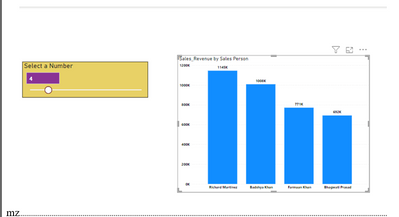
i have created the foolowing visual which shows the topN sales person based on the slicer value.
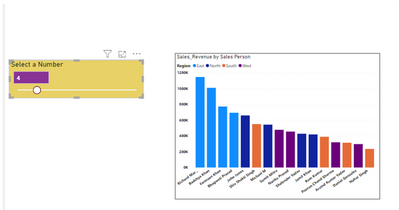
But as soon as i put region in legends, it no longer shows me top 4 sales person overall but top 4 for all the regions.
I would like to use region in legends but need only top 4 sales person irrespective of the region and not for all regions. Here is the what i am getting
Please help with a solution
Solved! Go to Solution.
1-Create a meaasure:
SalesTotal = SUM(PersonRegionTable[sales])2-Create a rank measure:
RankMEasure =
RANKX ( ALLSELECTED ( PersonRegionTable ), [SalesTotal] )3-Create a measure for your slicer value which is selected:
TOPNVALUE = SELECTEDVALUE(TOPNTABLE[VALUES])4-Create a measure as filter on the visual:
FILTERMeasure =
IF ( [RankMEasure] <= [TOPNVALUE], 1, BLANK () )
Then put the [FilterMeasure] on your Visual as Filter on this visual on FilterPane and set it equals to 1.
If this helps you, accept it as a solution.
Regards,
Loran
Hi @MeghnaZutshi ,
If you use the Filter Pane TOPN option, it works as you expect.
Btw, if you need to use your approach, please share a sample .pbix then we can fix your measure.
Regards,
Loran
Hi @MohammadLoran25 ,
Thanks for the solution. TOPN in filter pane works fine but i need TOPN to be based on the parameter chosen by the user in the slicer. I have attached my file, can you please help me with the solution .
@MohammadLoran25
Not able to upload file here. here are my measures:
It should show region as well which is there in the legends
1-Create a meaasure:
SalesTotal = SUM(PersonRegionTable[sales])2-Create a rank measure:
RankMEasure =
RANKX ( ALLSELECTED ( PersonRegionTable ), [SalesTotal] )3-Create a measure for your slicer value which is selected:
TOPNVALUE = SELECTEDVALUE(TOPNTABLE[VALUES])4-Create a measure as filter on the visual:
FILTERMeasure =
IF ( [RankMEasure] <= [TOPNVALUE], 1, BLANK () )
Then put the [FilterMeasure] on your Visual as Filter on this visual on FilterPane and set it equals to 1.
If this helps you, accept it as a solution.
Regards,
Loran
Check out the April 2026 Power BI update to learn about new features.
Sign up to receive a private message when registration opens and key events begin.
If you have recently started exploring Fabric, we'd love to hear how it's going. Your feedback can help with product improvements.
| User | Count |
|---|---|
| 36 | |
| 32 | |
| 27 | |
| 23 | |
| 16 |
| User | Count |
|---|---|
| 69 | |
| 50 | |
| 30 | |
| 25 | |
| 24 |