cancel
Showing results for 
Search instead for 
Did you mean: 

Vote for your favorite vizzies from the Power BI Dataviz World Championship submissions. Vote now!

Reply
donodackal
Helper I
Helper I

Text/Card Assistance

Hello


I have a filter in my report that filters all visuals by the filtered department/s.


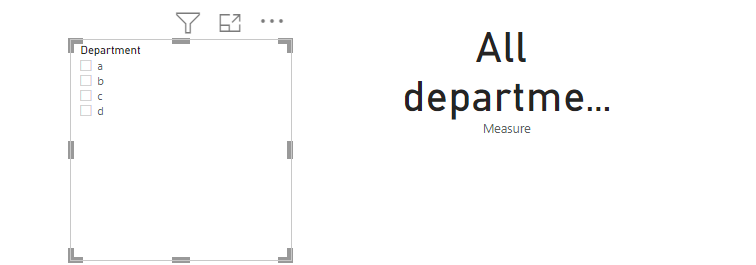
I would like to insert a card or text box to my report showing which department the page is filtered. I need help in creating the card/text box where:

  1. If only one department is selected, then the selected department is listed; or
  2. If more than one department is selected, the card/textbox states “multiple departments”; or
  3. If the filter is clear/all department is selected, the card/textbox states “all departments”.
1 ACCEPTED SOLUTION

@donodackal 

you can try this

Measure = 
VAR tbl=distinct('Table'[Department])
return if(COUNTROWS(tbl)=CALCULATE(DISTINCTCOUNT('Table'[Department]),ALL('Table')),"All department", if(COUNTROWS(tbl)>1,"multiple departments",max('Table'[Department])))


Did I answer your question? Mark my post as a solution!

Proud to be a Super User!


View solution in original post

3 REPLIES 3
ryan_mayu
Super User
Super User

@donodackal 

is this what you want?

Measure = 
VAR tbl=distinct('Table'[Department])
return if(COUNTROWS(tbl)=CALCULATE(DISTINCTCOUNT('Table'[Department]),ALL('Table')),"All department", CONCATENATEX(tbl,'Table'[Department],";"))

1.PNG

pls see the attachment below


Did I answer your question? Mark my post as a solution!

Proud to be a Super User!


Thank you! This fixes most of what I am after. However; if more than one department is selected (but not the entire list), I don't want to list them all but rather just mention "multiple departments". Is this possible? 

@donodackal 

you can try this

Measure = 
VAR tbl=distinct('Table'[Department])
return if(COUNTROWS(tbl)=CALCULATE(DISTINCTCOUNT('Table'[Department]),ALL('Table')),"All department", if(COUNTROWS(tbl)>1,"multiple departments",max('Table'[Department])))


Did I answer your question? Mark my post as a solution!

Proud to be a Super User!


Helpful resources

Announcements
Sticker Challenge 2026 Carousel

Join our Community Sticker Challenge 2026

If you love stickers, then you will definitely want to check out our Community Sticker Challenge!

January Power BI Update Carousel

Power BI Monthly Update - January 2026

Check out the January 2026 Power BI update to learn about new features.

FabCon Atlanta 2026 carousel

FabCon Atlanta 2026

Join us at FabCon Atlanta, March 16-20, for the ultimate Fabric, Power BI, AI and SQL community-led event. Save $200 with code FABCOMM.