Get certified for free when you join Fabric Data Days 2026 and dive into Fabric, Power BI, SQL, AI, and other essential data skills.
Join nowJuly 28 - August 9 | Final Round of the Power BI Dataviz World Championships. This is your chance. Learn more
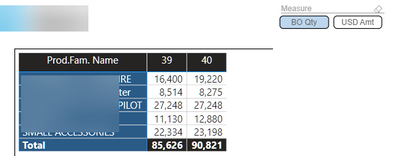
So I have a matrix that show my top 5.
Now I first only had Qty in and sorted it from high to low (so the biggest number on top).
A good idea seemed to make field parameter so I could switch between Quantity and USD.
So that is what I did.
And it works fine when I choose Qty I get Qty and for USD it shows USD.
However it will not sort anymore from highest to lowest because I switch between Qtd and Value.
Does anybody know a way around this?
Solved! Go to Solution.
Hi,
Unfortunately this is something that is not possible yet.
The issue already has been reported : https://community.powerbi.com/t5/Issues/Field-Parameter-breaks-sorting-order-in-visuals/idi-p/281687...
- Quentin
Hi,
Unfortunately this is something that is not possible yet.
The issue already has been reported : https://community.powerbi.com/t5/Issues/Field-Parameter-breaks-sorting-order-in-visuals/idi-p/281687...
- Quentin
@rpinxt , I think, I also observed this issue. Please log an idea - https://ideas.powerbi.com/ideas/
Join us in Barcelona for FabCon and SQLCon, the Fabric, Power BI, SQL, and AI community event. Save €200 with code FABCMTY200.
If you love stickers, then you will definitely want to check out our community sticker challenge, Barcelona edition!
Check out the July 2026 Power BI update to learn about new features.
| User | Count |
|---|---|
| 26 | |
| 22 | |
| 22 | |
| 20 | |
| 17 |
| User | Count |
|---|---|
| 35 | |
| 29 | |
| 21 | |
| 19 | |
| 17 |