Advance your Data & AI career with 50 days of live learning, dataviz contests, hands-on challenges, study groups & certifications and more!
Get registeredGet Fabric Certified for FREE during Fabric Data Days. Don't miss your chance! Request now
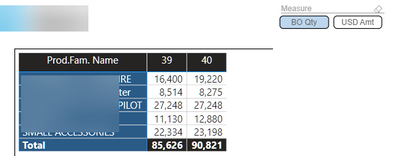
So I have a matrix that show my top 5.
Now I first only had Qty in and sorted it from high to low (so the biggest number on top).
A good idea seemed to make field parameter so I could switch between Quantity and USD.
So that is what I did.
And it works fine when I choose Qty I get Qty and for USD it shows USD.
However it will not sort anymore from highest to lowest because I switch between Qtd and Value.
Does anybody know a way around this?
Solved! Go to Solution.
Hi,
Unfortunately this is something that is not possible yet.
The issue already has been reported : https://community.powerbi.com/t5/Issues/Field-Parameter-breaks-sorting-order-in-visuals/idi-p/281687...
- Quentin
Hi,
Unfortunately this is something that is not possible yet.
The issue already has been reported : https://community.powerbi.com/t5/Issues/Field-Parameter-breaks-sorting-order-in-visuals/idi-p/281687...
- Quentin
@rpinxt , I think, I also observed this issue. Please log an idea - https://ideas.powerbi.com/ideas/
Advance your Data & AI career with 50 days of live learning, contests, hands-on challenges, study groups & certifications and more!
Check out the October 2025 Power BI update to learn about new features.