Get certified for free when you join Fabric Data Days 2026 and dive into Fabric, Power BI, SQL, AI, and other essential data skills.
Join nowData Days is here! Join us now for 60+ days of learning, challenges, and connection. Learn more
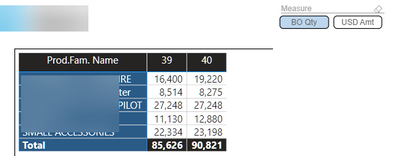
So I have a matrix that show my top 5.
Now I first only had Qty in and sorted it from high to low (so the biggest number on top).
A good idea seemed to make field parameter so I could switch between Quantity and USD.
So that is what I did.
And it works fine when I choose Qty I get Qty and for USD it shows USD.
However it will not sort anymore from highest to lowest because I switch between Qtd and Value.
Does anybody know a way around this?
Solved! Go to Solution.
Hi,
Unfortunately this is something that is not possible yet.
The issue already has been reported : https://community.powerbi.com/t5/Issues/Field-Parameter-breaks-sorting-order-in-visuals/idi-p/281687...
- Quentin
Hi,
Unfortunately this is something that is not possible yet.
The issue already has been reported : https://community.powerbi.com/t5/Issues/Field-Parameter-breaks-sorting-order-in-visuals/idi-p/281687...
- Quentin
@rpinxt , I think, I also observed this issue. Please log an idea - https://ideas.powerbi.com/ideas/
Don't miss out on Data Days, June 15 through August 7. Learn Fabric, Power BI, SQL, AI and more.
Check out the May 2026 Power BI update to learn about new features.
| User | Count |
|---|---|
| 23 | |
| 23 | |
| 20 | |
| 18 | |
| 14 |
| User | Count |
|---|---|
| 58 | |
| 51 | |
| 40 | |
| 30 | |
| 24 |