This time we’re going bigger than ever. Fabric, Power BI, SQL, AI and more. We're covering it all. You won't want to miss it.
Learn moreLevel up your Power BI skills this month - build one visual each week and tell better stories with data! Get started
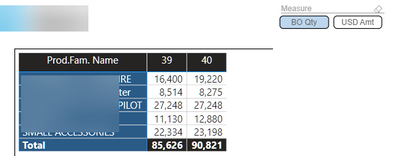
So I have a matrix that show my top 5.
Now I first only had Qty in and sorted it from high to low (so the biggest number on top).
A good idea seemed to make field parameter so I could switch between Quantity and USD.
So that is what I did.
And it works fine when I choose Qty I get Qty and for USD it shows USD.
However it will not sort anymore from highest to lowest because I switch between Qtd and Value.
Does anybody know a way around this?
Solved! Go to Solution.
Hi,
Unfortunately this is something that is not possible yet.
The issue already has been reported : https://community.powerbi.com/t5/Issues/Field-Parameter-breaks-sorting-order-in-visuals/idi-p/281687...
- Quentin
Hi,
Unfortunately this is something that is not possible yet.
The issue already has been reported : https://community.powerbi.com/t5/Issues/Field-Parameter-breaks-sorting-order-in-visuals/idi-p/281687...
- Quentin
@rpinxt , I think, I also observed this issue. Please log an idea - https://ideas.powerbi.com/ideas/
Check out the April 2026 Power BI update to learn about new features.
Sign up to receive a private message when registration opens and key events begin.
If you have recently started exploring Fabric, we'd love to hear how it's going. Your feedback can help with product improvements.
| User | Count |
|---|---|
| 36 | |
| 33 | |
| 27 | |
| 24 | |
| 18 |
| User | Count |
|---|---|
| 67 | |
| 49 | |
| 32 | |
| 27 | |
| 22 |