cancel
Showing results for 
Search instead for 
Did you mean: 

July 7 - July 17 | Round 2 of the Power BI Dataviz World Championships. Don't miss your chance! Learn more

Reply
jcastr02
Post Prodigy
Post Prodigy

Sorting by Index

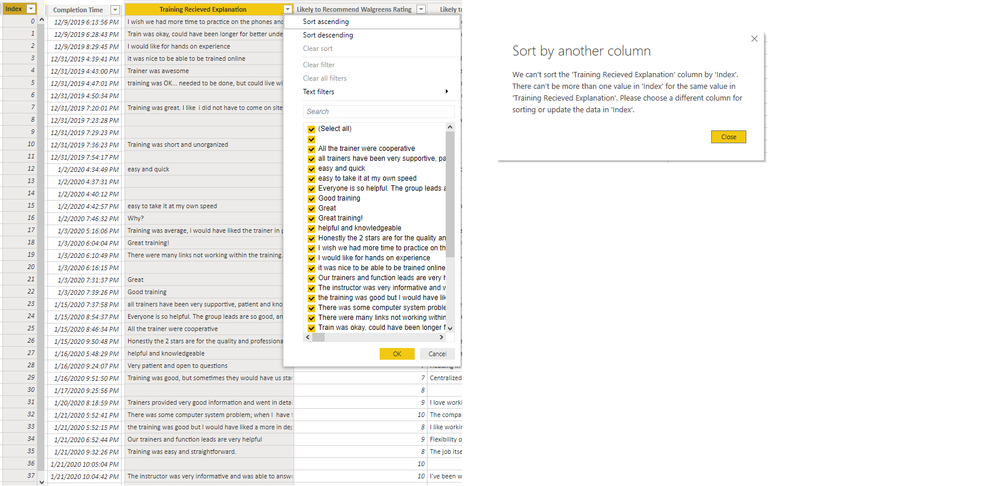
I am trying to sort the comments in the column Training Recieved Explanation by the completion date, when I tried that it gave me error message below.  I then tried to add a index column, and when I try to sort by that, I get same error message.  I added my BI file for help.  Please see table '30 Day New Hire Survey'   I've also looked at how data is set up, I have comments as text and col index as a whole number , please help.  


https://1drv.ms/u/s!Ava_12t7CNJtkEcQHD-Ralk-Qgjf?e=mg8hYy Index Sorting.png

1 ACCEPTED SOLUTION
Anonymous
Not applicable

I see, didnt realize that there would be the same date values aswell ofcourse. I've taken a look at your PBI file and i would suggest creating a new table from the one used with only the Comments and date and/or index. And then filter out the Blanks. 

BTW. The CTRL+Click on buttons is only in the desktop version. When published to service you no longer need to use CTRL. 🙂

View solution in original post

6 REPLIES 6
Anonymous
Not applicable

You get that error because there are multiple empty rows on explanation. Why dont you just sort on completion time?

@Anonymous  I tried to sort the comments by Completion Time -    On the visual I have a matrix box with all the comments and I'd like to sort from newest to oldest, but when I try to sort the column, I get the same error message

Anonymous
Not applicable

I see, didnt realize that there would be the same date values aswell ofcourse. I've taken a look at your PBI file and i would suggest creating a new table from the one used with only the Comments and date and/or index. And then filter out the Blanks. 

BTW. The CTRL+Click on buttons is only in the desktop version. When published to service you no longer need to use CTRL. 🙂

Thank you SO much this worked!!! and thank you for the recommendations on the buttons!! 🙂 @Anonymous 

@Anonymous   It looks like some of my tables worked, but others didn't when I followed process.  See 30 day tab - ones with red background on comments field, those worked.  one with purple background is still giving me error even after filtering out blanks.  https://1drv.ms/u/s!Ava_12t7CNJtkEcQHD-Ralk-Qgjf 

Anonymous
Not applicable

That could be because there are still duplicate values. You could also delete the duplicate values, but this will also result in a loss of data and you need to be aware of that.

Helpful resources

Announcements
FabCon and SQLCon Barcelona 2026

FabCon & SQLCon – Barcelona 2026

Join us in Barcelona for FabCon and SQLCon, the Fabric, Power BI, SQL, and AI community event. Save €200 with code FABCMTY200.

60 days of Data Days Carousel

Data Days 2026

Join Fabric Data Days 2026: 60 days of free live/on-demand sessions, challenges, study groups, and certification opportunities.

Power BI DataViz World Championships carousel

Power BI DataViz World Championships - June 2026

A new Power BI DataViz World Championship is coming this June! Don't miss out on submitting your entry.