cancel
Showing results for 
Search instead for 
Did you mean: 

The Power BI Data Visualization World Championships is back! Get ahead of the game and start preparing now! Learn more

Reply
jcastr02
Post Prodigy
Post Prodigy

Sorting by Index

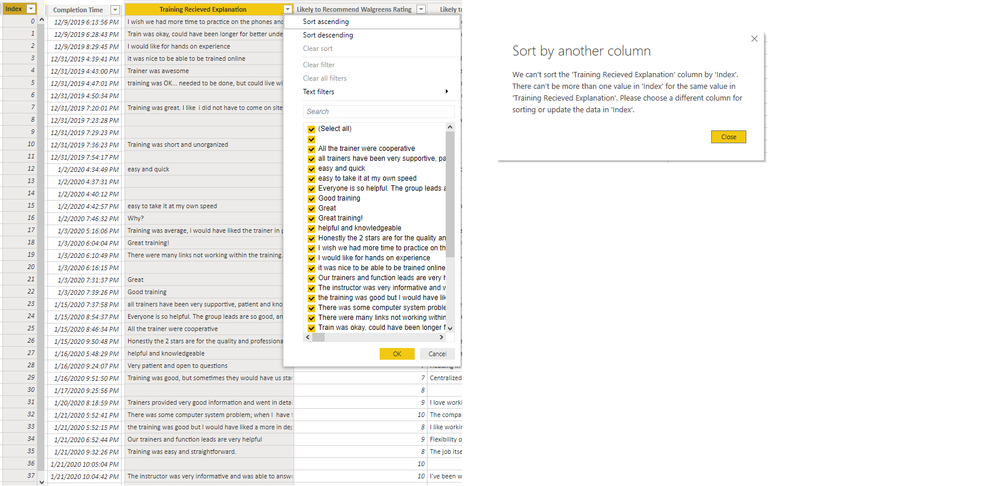
I am trying to sort the comments in the column Training Recieved Explanation by the completion date, when I tried that it gave me error message below.  I then tried to add a index column, and when I try to sort by that, I get same error message.  I added my BI file for help.  Please see table '30 Day New Hire Survey'   I've also looked at how data is set up, I have comments as text and col index as a whole number , please help.  


https://1drv.ms/u/s!Ava_12t7CNJtkEcQHD-Ralk-Qgjf?e=mg8hYy Index Sorting.png

1 ACCEPTED SOLUTION
Anonymous
Not applicable

I see, didnt realize that there would be the same date values aswell ofcourse. I've taken a look at your PBI file and i would suggest creating a new table from the one used with only the Comments and date and/or index. And then filter out the Blanks. 

BTW. The CTRL+Click on buttons is only in the desktop version. When published to service you no longer need to use CTRL. 🙂

View solution in original post

6 REPLIES 6
Anonymous
Not applicable

You get that error because there are multiple empty rows on explanation. Why dont you just sort on completion time?

@Anonymous  I tried to sort the comments by Completion Time -    On the visual I have a matrix box with all the comments and I'd like to sort from newest to oldest, but when I try to sort the column, I get the same error message

Anonymous
Not applicable

I see, didnt realize that there would be the same date values aswell ofcourse. I've taken a look at your PBI file and i would suggest creating a new table from the one used with only the Comments and date and/or index. And then filter out the Blanks. 

BTW. The CTRL+Click on buttons is only in the desktop version. When published to service you no longer need to use CTRL. 🙂

Thank you SO much this worked!!! and thank you for the recommendations on the buttons!! 🙂 @Anonymous 

@Anonymous   It looks like some of my tables worked, but others didn't when I followed process.  See 30 day tab - ones with red background on comments field, those worked.  one with purple background is still giving me error even after filtering out blanks.  https://1drv.ms/u/s!Ava_12t7CNJtkEcQHD-Ralk-Qgjf 

Anonymous
Not applicable

That could be because there are still duplicate values. You could also delete the duplicate values, but this will also result in a loss of data and you need to be aware of that.

Helpful resources

Announcements
Power BI DataViz World Championships

Power BI Dataviz World Championships

The Power BI Data Visualization World Championships is back! Get ahead of the game and start preparing now!

December 2025 Power BI Update Carousel

Power BI Monthly Update - December 2025

Check out the December 2025 Power BI Holiday Recap!

FabCon Atlanta 2026 carousel

FabCon Atlanta 2026

Join us at FabCon Atlanta, March 16-20, for the ultimate Fabric, Power BI, AI and SQL community-led event. Save $200 with code FABCOMM.