This time we’re going bigger than ever. Fabric, Power BI, SQL, AI and more. We're covering it all. You won't want to miss it.
Learn moreDid you hear? There's a new SQL AI Developer certification (DP-800). Start preparing now and be one of the first to get certified. Register now
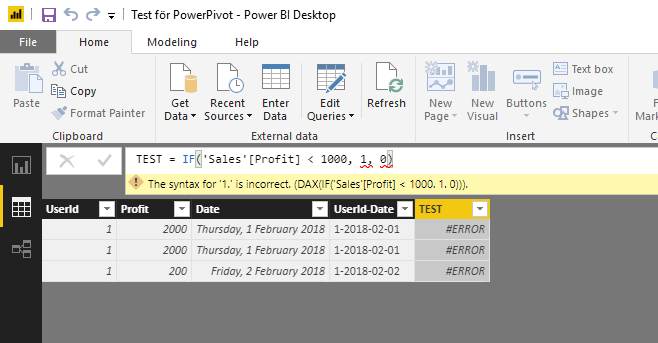
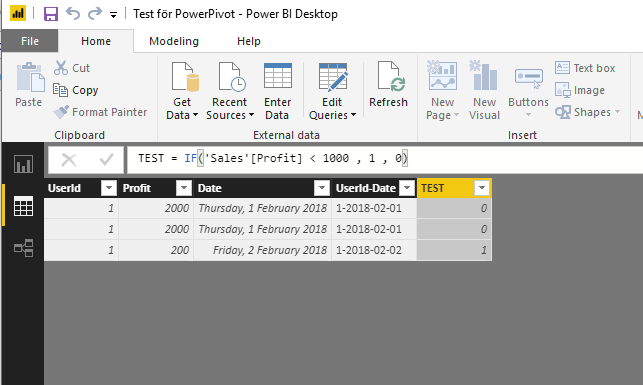
IF-statement in it's simplest form is causing issues.
"Profit" is of datatype "Whole number".
What's wrong here? Running desktop version 2.58.5103.501.
Solved! Go to Solution.
The problem was a missing White-space after "1000".
I have never had any problems with it before..
This works ;o
Hey,
I'm not sure, but do you need to use ";" instead of "," as a separator of arguments?
Check your regional settings at the OS level.
Regards
Tom
if this is calculated measure then 'Sales'[Profit] >1 is comparing a column (multiple values) with scalar, which won't work
this syntax should work fine for calculated column though
The problem was a missing White-space after "1000".
I have never had any problems with it before..
This works ;o
you can have none or multiple whitespaces in the syntax, for sure that wasn't the reason for the measure not working
I agree it does look strange.
But here I have two pictures taken a few seconds ago.
Must be some strange OS-culture bug.
Check out the April 2026 Power BI update to learn about new features.
Sign up to receive a private message when registration opens and key events begin.
If you have recently started exploring Fabric, we'd love to hear how it's going. Your feedback can help with product improvements.
| User | Count |
|---|---|
| 34 | |
| 31 | |
| 25 | |
| 20 | |
| 16 |
| User | Count |
|---|---|
| 61 | |
| 49 | |
| 28 | |
| 23 | |
| 23 |