Get certified for free when you join Fabric Data Days 2026 and dive into Fabric, Power BI, SQL, AI, and other essential data skills.
Join nowJuly 7 - July 17 | Round 2 of the Power BI Dataviz World Championships. Don't miss your chance! Learn more
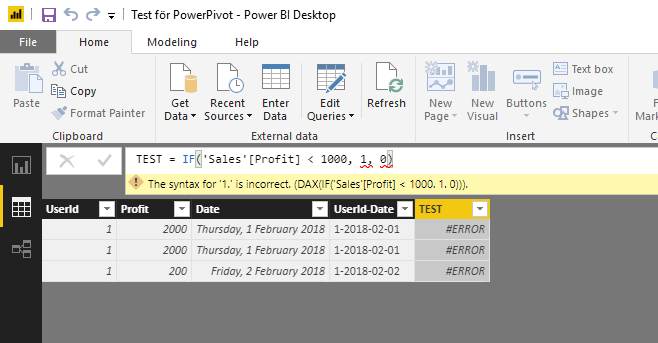
IF-statement in it's simplest form is causing issues.
"Profit" is of datatype "Whole number".
What's wrong here? Running desktop version 2.58.5103.501.
Solved! Go to Solution.
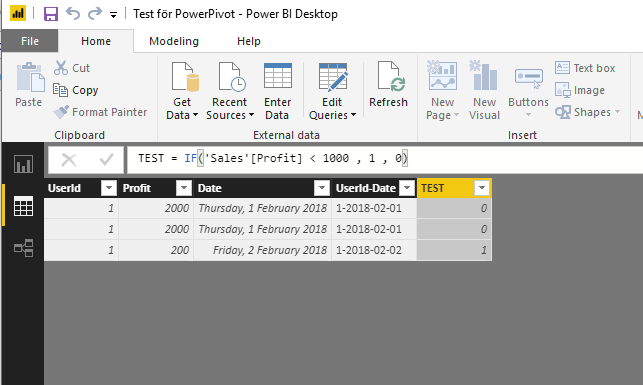
The problem was a missing White-space after "1000".
I have never had any problems with it before..
This works ;o
Hey,
I'm not sure, but do you need to use ";" instead of "," as a separator of arguments?
Check your regional settings at the OS level.
Regards
Tom
if this is calculated measure then 'Sales'[Profit] >1 is comparing a column (multiple values) with scalar, which won't work
this syntax should work fine for calculated column though
The problem was a missing White-space after "1000".
I have never had any problems with it before..
This works ;o
you can have none or multiple whitespaces in the syntax, for sure that wasn't the reason for the measure not working
I agree it does look strange.
But here I have two pictures taken a few seconds ago.
Must be some strange OS-culture bug.
Join us in Barcelona for FabCon and SQLCon, the Fabric, Power BI, SQL, and AI community event. Save €200 with code FABCMTY200.
If you love stickers, then you will definitely want to check out our community sticker challenge, Barcelona edition!
Check out the July 2026 Power BI update to learn about new features.
| User | Count |
|---|---|
| 30 | |
| 23 | |
| 23 | |
| 23 | |
| 14 |
| User | Count |
|---|---|
| 46 | |
| 33 | |
| 20 | |
| 18 | |
| 16 |