cancel
Showing results for 
Search instead for 
Did you mean: 

The Power BI Data Visualization World Championships is back! It's time to submit your entry. Live now!

Reply
MrMarshall
Helper II
Helper II

Simple IF Causing error

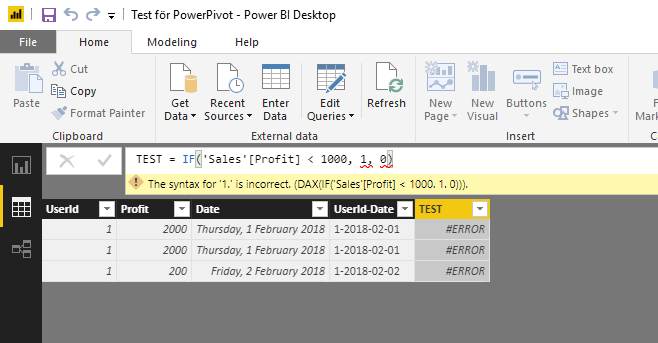
IF-statement in it's simplest form is causing issues.

"Profit" is of datatype "Whole number". 


What's wrong here? Running desktop version 2.58.5103.501.


Screenshot_70.png

1 ACCEPTED SOLUTION

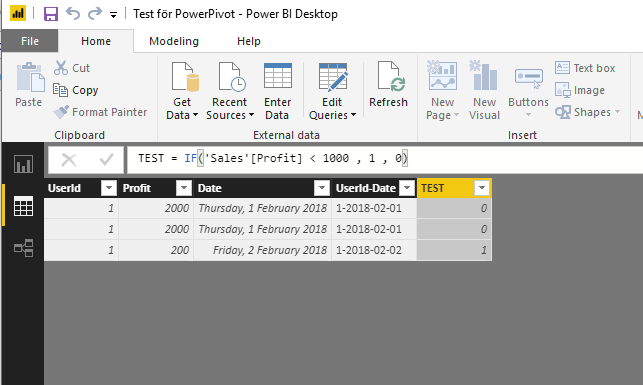
The problem was a missing White-space after "1000". 
I have never had any problems with it before.. 

This works ;o


Screenshot_71.png

View solution in original post

5 REPLIES 5
TomMartens
Super User
Super User

Hey,


I'm not sure, but do you need to use ";" instead of "," as a separator of arguments?


Check your regional settings at the OS level.


Regards

Tom 


Did I answer your question? Mark my post as a solution, this will help others!

Proud to be a Super User!
I accept Kudos 😉
Hamburg, Germany
Stachu
Community Champion
Community Champion

if this is calculated measure then 'Sales'[Profit] >1 is comparing a column (multiple values) with scalar, which won't work
this syntax should work fine for calculated column though


Did I answer your question? Mark my post as a solution!
Thank you for the kudos 🙂

The problem was a missing White-space after "1000". 
I have never had any problems with it before.. 

This works ;o


Screenshot_71.png

you can have none or multiple whitespaces in the syntax, for sure that wasn't the reason for the measure not working


Did I answer your question? Mark my post as a solution!
Thank you for the kudos 🙂

I agree it does look strange. 
But here I have two pictures taken a few seconds ago.

Must be some strange OS-culture bug.


Screenshot_74.pngScreenshot_73.png

Helpful resources

Announcements
Power BI DataViz World Championships

Power BI Dataviz World Championships

The Power BI Data Visualization World Championships is back! It's time to submit your entry.

January Power BI Update Carousel

Power BI Monthly Update - January 2026

Check out the January 2026 Power BI update to learn about new features.

FabCon Atlanta 2026 carousel

FabCon Atlanta 2026

Join us at FabCon Atlanta, March 16-20, for the ultimate Fabric, Power BI, AI and SQL community-led event. Save $200 with code FABCOMM.