Learn from the best! Meet the four finalists headed to the FINALS of the Power BI Dataviz World Championships! Register now
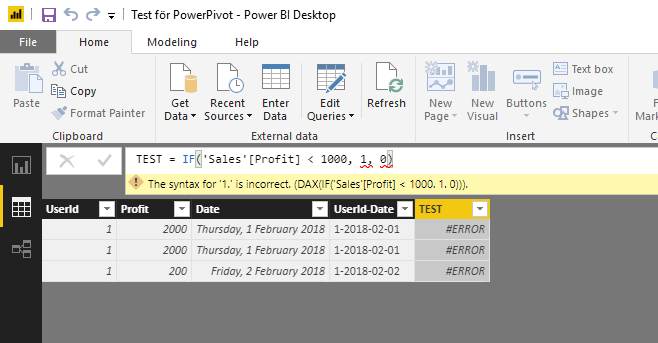
IF-statement in it's simplest form is causing issues.
"Profit" is of datatype "Whole number".
What's wrong here? Running desktop version 2.58.5103.501.
Solved! Go to Solution.
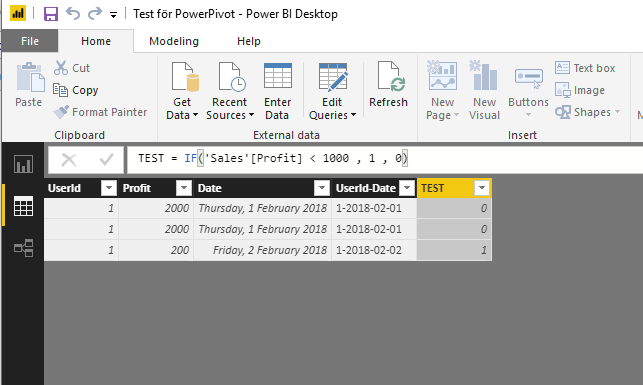
The problem was a missing White-space after "1000".
I have never had any problems with it before..
This works ;o
Hey,
I'm not sure, but do you need to use ";" instead of "," as a separator of arguments?
Check your regional settings at the OS level.
Regards
Tom
if this is calculated measure then 'Sales'[Profit] >1 is comparing a column (multiple values) with scalar, which won't work
this syntax should work fine for calculated column though
The problem was a missing White-space after "1000".
I have never had any problems with it before..
This works ;o
you can have none or multiple whitespaces in the syntax, for sure that wasn't the reason for the measure not working
I agree it does look strange.
But here I have two pictures taken a few seconds ago.
Must be some strange OS-culture bug.
A new Power BI DataViz World Championship is coming this June! Don't miss out on submitting your entry.
Share feedback directly with Fabric product managers, participate in targeted research studies and influence the Fabric roadmap.
| User | Count |
|---|---|
| 47 | |
| 36 | |
| 27 | |
| 15 | |
| 15 |
| User | Count |
|---|---|
| 58 | |
| 56 | |
| 38 | |
| 21 | |
| 21 |