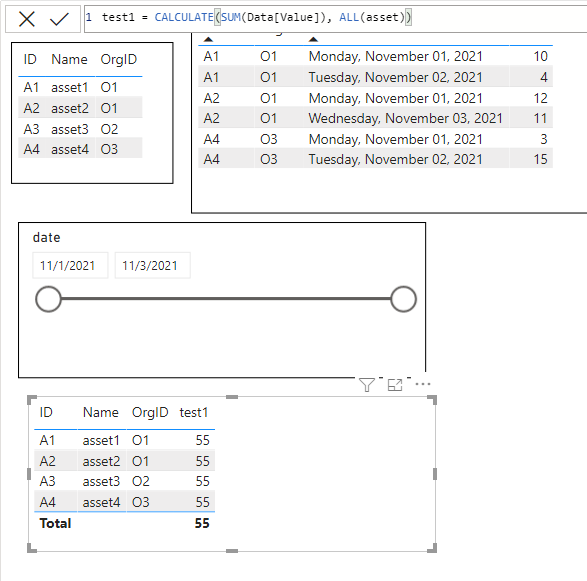
I am trying to show all data irrespective of the date slicer
I have data like below but when I filter my data based on a date using slicer (1st nov to 2nd nov).
As, A3 data is not available between 1st Nov to 2nd Nov. It is not shown in the final table.
But I need to show all asset data even when data is not available during selected dates.
I tried many ways using joins. But not able to succeed.
| AssetMasterData | | | |
| ID | Name | | OrgID |
| A1 | asset1 | | O1 |
| A2 | asset2 | | O1 |
| A3 | asset3 | | O2 |
| A4 | asset4 | | O3 |
| Data | | | | | | |
| AssetID | | OrgID | | Value | | date |
| A1 | | O1 | | 10 | | 1-Nov-21 |
| A2 | | O1 | | 12 | | 1-Nov-21 |
| A4 | | O3 | | 3 | | 1-Nov-21 |
| A1 | | O1 | | 4 | | 2-Nov-21 |
| A4 | | O3 | | 15 | | 2-Nov-21 |
| A2 | | O1 | | 11 | | 3-Nov-21 |
| Final(expected table) | | | | | |
| AssetID | Name | | OrgID | | Value |
| A1 | asset1 | | O1 | | 14 |
| A2 | asset2 | | O1 | | 12 |
| A3 | asset3 | | O2 | | null |
| A4 | asset4 | | O3 | | 15 |