cancel
Showing results for 
Search instead for 
Did you mean: 

Did you hear? There's a new SQL AI Developer certification (DP-800). Start preparing now and be one of the first to get certified. Register now

Reply
ravitejaballa
Helper III
Helper III

Show missing data

I am trying to show all data irrespective of the date slicer


I have data like below but when I filter my data based on a date using slicer (1st nov to 2nd nov).
As, A3 data is not available between 1st Nov to 2nd Nov. It is not shown in the final table.

But I need to show all asset data even when data is not available during selected dates.


I tried many ways using joins. But not able to succeed. 


AssetMasterData   
IDName OrgID
A1asset1 O1
A2asset2 O1
A3asset3 O2
A4asset4 O3


Data      
AssetID OrgID Value date
A1 O1 10 1-Nov-21
A2 O1 12 1-Nov-21
A4 O3 3 1-Nov-21
A1 O1 4 2-Nov-21
A4 O3 15 2-Nov-21
A2 O1 11 3-Nov-21


Final(expected table)     
AssetIDName OrgID Value
A1asset1 O1 14
A2asset2 O1 12
A3asset3 O2 null
A4asset4 O3 15
1 ACCEPTED SOLUTION

@ravitejaballa Well, you are going to need to use a measure. Try this:

test1 =SUM(Data[Value]) + 0


Follow on LinkedIn
@ me in replies or I'll lose your thread!!!
Instead of a Kudo, please vote for this idea
Become an expert!: Enterprise DNA
External Tools: MSHGQM
YouTube Channel!: Microsoft Hates Greg
Latest book!:
DAX For Humans

DAX is easy, CALCULATE makes DAX hard...

View solution in original post

4 REPLIES 4
Greg_Deckler
Community Champion
Community Champion

@ravitejaballa You will need to use something like ALL in your calculation to remove filter context.


Follow on LinkedIn
@ me in replies or I'll lose your thread!!!
Instead of a Kudo, please vote for this idea
Become an expert!: Enterprise DNA
External Tools: MSHGQM
YouTube Channel!: Microsoft Hates Greg
Latest book!:
DAX For Humans

DAX is easy, CALCULATE makes DAX hard...

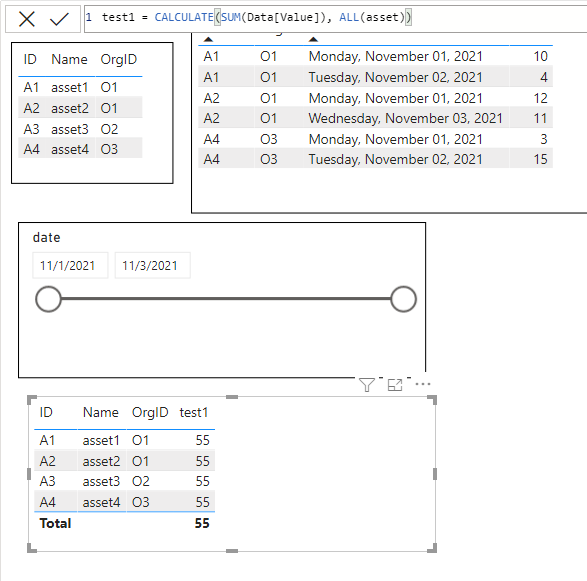
@Greg_Deckler ALL didn't help me

It brings required assetID but it sum up all assets value column

test1 = CALCULATE(SUM(Data[Value]), ALL(asset))


ravitejaballa_0-1636534938394.png


@ravitejaballa Well, you are going to need to use a measure. Try this:

test1 =SUM(Data[Value]) + 0


Follow on LinkedIn
@ me in replies or I'll lose your thread!!!
Instead of a Kudo, please vote for this idea
Become an expert!: Enterprise DNA
External Tools: MSHGQM
YouTube Channel!: Microsoft Hates Greg
Latest book!:
DAX For Humans

DAX is easy, CALCULATE makes DAX hard...

But I am not using measure or calculated column

Helpful resources

Announcements
April Power BI Update Carousel

Power BI Monthly Update - April 2026

Check out the April 2026 Power BI update to learn about new features.

New to Fabric survey Carousel

New to Fabric Survey

If you have recently started exploring Fabric, we'd love to hear how it's going. Your feedback can help with product improvements.

Power BI DataViz World Championships carousel

Power BI DataViz World Championships - June 2026

A new Power BI DataViz World Championship is coming this June! Don't miss out on submitting your entry.