Get certified for free when you join Fabric Data Days 2026 and dive into Fabric, Power BI, SQL, AI, and other essential data skills.
Join nowTry your skills in the Power BI Dataviz World Championship! Round one ends June 26. Join now
I am trying to show all data irrespective of the date slicer
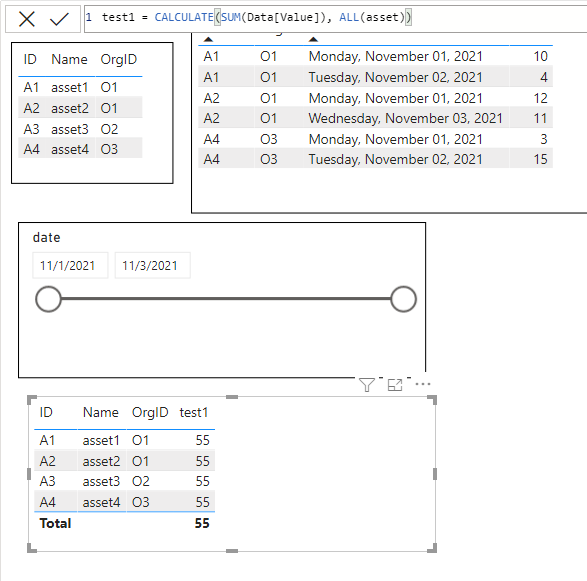
I have data like below but when I filter my data based on a date using slicer (1st nov to 2nd nov).
As, A3 data is not available between 1st Nov to 2nd Nov. It is not shown in the final table.
But I need to show all asset data even when data is not available during selected dates.
I tried many ways using joins. But not able to succeed.
| AssetMasterData | |||
| ID | Name | OrgID | |
| A1 | asset1 | O1 | |
| A2 | asset2 | O1 | |
| A3 | asset3 | O2 | |
| A4 | asset4 | O3 |
| Data | ||||||
| AssetID | OrgID | Value | date | |||
| A1 | O1 | 10 | 1-Nov-21 | |||
| A2 | O1 | 12 | 1-Nov-21 | |||
| A4 | O3 | 3 | 1-Nov-21 | |||
| A1 | O1 | 4 | 2-Nov-21 | |||
| A4 | O3 | 15 | 2-Nov-21 | |||
| A2 | O1 | 11 | 3-Nov-21 |
| Final(expected table) | |||||
| AssetID | Name | OrgID | Value | ||
| A1 | asset1 | O1 | 14 | ||
| A2 | asset2 | O1 | 12 | ||
| A3 | asset3 | O2 | null | ||
| A4 | asset4 | O3 | 15 |
Solved! Go to Solution.
@ravitejaballa Well, you are going to need to use a measure. Try this:
test1 =SUM(Data[Value]) + 0
@ravitejaballa You will need to use something like ALL in your calculation to remove filter context.
@Greg_Deckler ALL didn't help me
It brings required assetID but it sum up all assets value column
@ravitejaballa Well, you are going to need to use a measure. Try this:
test1 =SUM(Data[Value]) + 0
But I am not using measure or calculated column
Don't miss out on Data Days, June 15 through August 7. Learn Fabric, Power BI, SQL, AI and more.
Check out the May 2026 Power BI update to learn about new features.
| User | Count |
|---|---|
| 22 | |
| 22 | |
| 21 | |
| 20 | |
| 12 |
| User | Count |
|---|---|
| 58 | |
| 55 | |
| 41 | |
| 36 | |
| 34 |