cancel
Showing results for 
Search instead for 
Did you mean: 

The Power BI Data Visualization World Championships is back! It's time to submit your entry. Live now!

Reply
ravitejaballa
Helper III
Helper III

Show missing data

I am trying to show all data irrespective of the date slicer


I have data like below but when I filter my data based on a date using slicer (1st nov to 2nd nov).
As, A3 data is not available between 1st Nov to 2nd Nov. It is not shown in the final table.

But I need to show all asset data even when data is not available during selected dates.


I tried many ways using joins. But not able to succeed. 


AssetMasterData   
IDName OrgID
A1asset1 O1
A2asset2 O1
A3asset3 O2
A4asset4 O3


Data      
AssetID OrgID Value date
A1 O1 10 1-Nov-21
A2 O1 12 1-Nov-21
A4 O3 3 1-Nov-21
A1 O1 4 2-Nov-21
A4 O3 15 2-Nov-21
A2 O1 11 3-Nov-21


Final(expected table)     
AssetIDName OrgID Value
A1asset1 O1 14
A2asset2 O1 12
A3asset3 O2 null
A4asset4 O3 15
1 ACCEPTED SOLUTION

@ravitejaballa Well, you are going to need to use a measure. Try this:

test1 =SUM(Data[Value]) + 0


Follow on LinkedIn
@ me in replies or I'll lose your thread!!!
Instead of a Kudo, please vote for this idea
Become an expert!: Enterprise DNA
External Tools: MSHGQM
YouTube Channel!: Microsoft Hates Greg
Latest book!:
DAX For Humans

DAX is easy, CALCULATE makes DAX hard...

View solution in original post

4 REPLIES 4
Greg_Deckler
Community Champion
Community Champion

@ravitejaballa You will need to use something like ALL in your calculation to remove filter context.


Follow on LinkedIn
@ me in replies or I'll lose your thread!!!
Instead of a Kudo, please vote for this idea
Become an expert!: Enterprise DNA
External Tools: MSHGQM
YouTube Channel!: Microsoft Hates Greg
Latest book!:
DAX For Humans

DAX is easy, CALCULATE makes DAX hard...

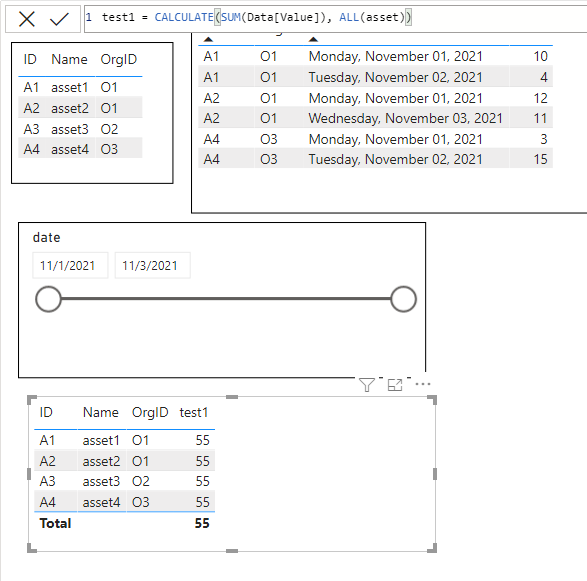
@Greg_Deckler ALL didn't help me

It brings required assetID but it sum up all assets value column

test1 = CALCULATE(SUM(Data[Value]), ALL(asset))


ravitejaballa_0-1636534938394.png


@ravitejaballa Well, you are going to need to use a measure. Try this:

test1 =SUM(Data[Value]) + 0


Follow on LinkedIn
@ me in replies or I'll lose your thread!!!
Instead of a Kudo, please vote for this idea
Become an expert!: Enterprise DNA
External Tools: MSHGQM
YouTube Channel!: Microsoft Hates Greg
Latest book!:
DAX For Humans

DAX is easy, CALCULATE makes DAX hard...

But I am not using measure or calculated column

Helpful resources

Announcements
FabCon Atlanta 2026 carousel

FabCon Atlanta 2026

Join us at FabCon Atlanta, March 16-20, for the ultimate Fabric, Power BI, AI and SQL community-led event. Save $200 with code FABCOMM.