
Get certified for free when you join Fabric Data Days 2026 and dive into Fabric, Power BI, SQL, AI, and other essential data skills.
Join nowJuly 7 - July 17 | Round 2 of the Power BI Dataviz World Championships. Don't miss your chance! Learn more
Hi,
I would like to change the color of a row if 2 field have the same name for example if I have the table (first name, last name, age) I would like to color of the same color row who has the same first name but the problem is that by using conditionnal formatting I can deal only with values so I have no idea on how to do it or if it is possible.
Could someone help me please.
Thank you.
Solved! Go to Solution.
Hi @Anonymous ,
These are two separate measures.
The first one:
Measure = SELECTEDVALUE(Table1[FirstName])
The Index measure:
Index = RANKX(ALLSELECTED(Table1),[Measure],,ASC,Dense)
Best regards,
Yuliana Gu
Hi @Anonymous ,
You can create below measures:
Measure = SELECTEDVALUE(Table1[FirstName]) Index = RANKX(ALLSELECTED(Table1),[Measure],,ASC,Dense)
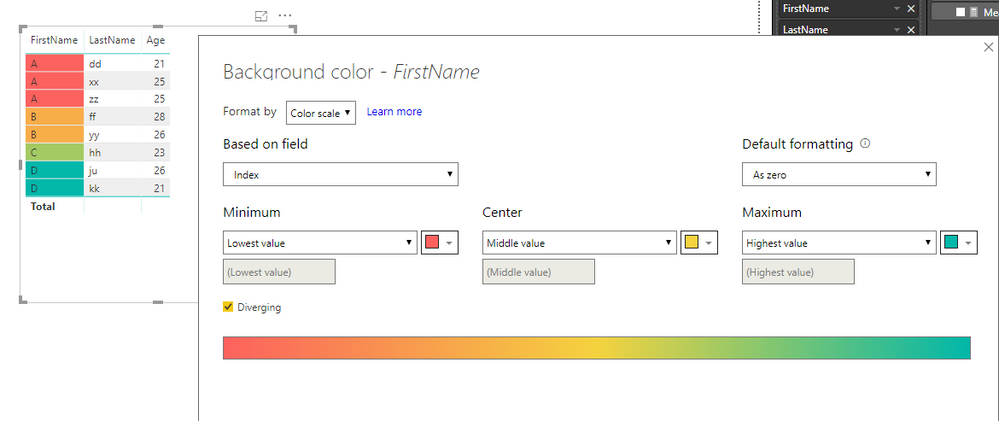
Then, set conditional formatting as below:
Best regards,
Yuliana Gu
Thank you for your answer I tried your measure but it seems like there is a syntax error around the "Index"
Hi @Anonymous ,
What is the error?
Regards,
Yuliana Gu
Hi @v-yulgu-msft ,
It say that this syntax is incorrecthere is my measure as I follow yours
I tried to put ";" instead of "," inside the RANKX function but it's still not working
Hi @Anonymous ,
These are two separate measures.
The first one:
Measure = SELECTEDVALUE(Table1[FirstName])
The Index measure:
Index = RANKX(ALLSELECTED(Table1),[Measure],,ASC,Dense)
Best regards,
Yuliana Gu
Join us in Barcelona for FabCon and SQLCon, the Fabric, Power BI, SQL, and AI community event. Save €200 with code FABCMTY200.
Join Fabric Data Days 2026: 60 days of free live/on-demand sessions, challenges, study groups, and certification opportunities.
| User | Count |
|---|---|
| 22 | |
| 22 | |
| 18 | |
| 17 | |
| 13 |
| User | Count |
|---|---|
| 63 | |
| 50 | |
| 46 | |
| 41 | |
| 39 |